
Title
Attention Anonymous User!Your download speed is severely restricted. Registered users download at full speed without waiting. Register now!

ONLYOFFICE Desktop Editors v. 9.4.0
Office & Documentsv. 9.4.0

Original Descriptions
🇱🇻Latvian
🇷🇺Russian
🇬🇧English
Instant Translation
🇩🇪Deutsch
🇪🇸Español
🇫🇷Français
🇪🇪Eesti
🇱🇹Lietuvių
🇵🇱Polski
🇺🇦Українська
🇮🇹Italiano
🇵🇹Português
🇫🇮Suomi
🇸🇪Svenska
🇳🇴Norsk
🇨🇳中文
🇯🇵日本語
Operating System
Windows
11108/8.17
Architecture
64-bit (x64)
Apraksts
ONLYOFFICE Desktop Editors ir jaudīgs un bezmaksas biroja lietotņu komplekts, ko izstrādājis uzņēmums Ascensio System SIA un kas nodrošina profesionālus rīkus teksta dokumentu, izklājlapu, prezentāciju un PDF failu apstrādei. Balstīts uz Chromium Embedded Framework tehnoloģiju, šis darbvirsmas klients apvieno augstu saderību ar Microsoft Office formātiem (DOCX, XLSX, PPTX) un modernu, intuitīvu lietotāja saskarni. Tas ir lieliski piemērots gan individuāliem lietotājiem, gan uzņēmumiem, kuri meklē uzticamu un funkcionāli bagātu alternatīvu tradicionālajiem biroja rīkiem.
Lietotne izceļas ar savām papildu sadarbības un integrācijas iespējām, ļaujot lietotājiem pieslēgties tādiem mākoņpakalpojumiem kā ONLYOFFICE Workspace, Nextcloud, OwnCloud vai Seafile, lai ērti rediģētu dokumentus reāllaikā komandā. Turklāt plašais spraudņu klāsts un iebūvētie AI asistenti palīdz automatizēt ikdienas uzdevumus, tulkot tekstu, veidot atskaites un uzlabot darba ražīgumu, padarot to par vispusīgu un mūsdienu prasībām atbilstošu risinājumu.
Galvenās Funkcijas
- Visaptveroši redaktori: Ietver pilnvērtīgus rīkus teksta dokumentiem, sarežģītām izklājlapām, dinamiskām prezentācijām un PDF failu skatīšanai un rediģēšanai.
- Augsta saderība ar formātiem: Nodrošina nevainojamu savietojumu ar MS Office formātiem (DOCX, XLSX, PPTX) un atbalsta ODF standartus.
- Mākoņpakalpojumu integrācija: Ērta savienošanās ar ONLYOFFICE, Nextcloud un citiem mākoņiem tiešsaistes sadarbībai un dokumentu sinhronizācijai.
- Reāllaika sadarbība: Nodrošina iespēju kopīgi rediģēt dokumentus, pievienot komentārus un tērzēt tieši darbvirsmas lietottnē.
- Paplašināmība un spraudņi: Iespēja integrēt papildu rīkus, piemēram, tulkošanas servisus, bibliogrāfiju pārvaldību un mākslīgā intelekta asistentus.
How to Install / Run
- 1Atveriet lietotņu pārvaldnieku vai programmatūras centru savā operētājsistēmā.
- 2Atrast 'ONLYOFFICE Desktop Editors' meklēšanas joslā.
- 3Noklikšķiniet uz Instalēt un pēc tam palaidiet lietojni no savas programmu izvēlnes.
Plusi / Priekšrocības
- Augsta saderība ar Microsoft Office failu formātiem
- Pieejams bez maksas ar atvērtā koda AGPL-3.0 licenci
- Iespēja strādāt gan bezsaistē, gan tiešsaistē ar mākoni
- Mūsdienīga un viegli pārskatāma cilņu saskarne
Mīnusi / Ierobežojumi
- Lielāks resursu patēriņš Chromium bāzes dēļ
- Dažas uzņēmuma līmeņa funkcijas prasa komerciālu licenci
Описание
ONLYOFFICE Desktop Editors — это мощный офисный пакет, разработанный компанией Ascensio System SIA, который предоставляет профессиональные инструменты для работы с текстовыми документами, электронными таблицами, презентациями и файлами PDF. Созданный на базе платформы Chromium Embedded Framework, этот настольный клиент сочетает высокую совместимость с форматами Microsoft Office (DOCX, XLSX, PPTX) и современный, интуитивно понятный интерфейс с вкладками. Это идеальный выбор как для индивидуальных пользователей, так и для корпоративных команд, ищущих надежную альтернативу традиционным офисным приложениям.
Приложение выделяется своими возможностями совместной работы, позволяя подключаться к облачным платформам, таким как ONLYOFFICE Workspace, Nextcloud, OwnCloud или Seafile, для редактирования документов в реальном времени. Благодаря богатой экосистеме плагинов, поддержке макросов и встроенным средствам безопасности, ONLYOFFICE Desktop Editors обеспечивает высокий уровень продуктивности и автоматизацию повседневных задач на различных операционных системах.
Ключевые Особенности
- Комплексный офисный пакет: Полнофункциональные редакторы для текстовых документов, таблиц, презентаций, а также инструменты для работы с PDF.
- Высокая совместимость форматов: Полная поддержка стандартов Microsoft Office (DOCX, XLSX, PPTX) и OpenDocument без искажения верстки.
- Интеграция с облаком: Быстрое подключение к ONLYOFFICE Workspace, Nextcloud и другим облачным хранилищам для совместной работы.
- Совместное редактирование: Возможность командной работы над документами в реальном времени, рецензирования, комментирования и чата.
- Расширяемость и плагины: Встроенный магазин плагинов для подключения переводчиков, словарей, генераторов цитат и ИИ-помощников.
How to Install / Run
- 1Откройте центр приложений или менеджер пакетов в вашей операционной системе.
- 2Найдите 'ONLYOFFICE Desktop Editors' через строку поиска.
- 3Нажмите кнопку установки и запустите офисный пакет из меню установленных программ.
Преимущества (Плюсы)
- Отличная совместимость с файлами форматов Microsoft Office
- Распространяется под свободной лицензией AGPL-3.0 для персонального использования
- Удобное переключение между автономным режимом и облачной совместной работой
- Современный и понятный интерфейс с вкладками
Недостатки (Минусы)
- Повышенное потребление оперативной памяти из-за использования Chromium
- Продвинутые административные и корпоративные функции требуют коммерческой лицензии
Description
ONLYOFFICE Desktop Editors is a powerful office suite developed by Ascensio System SIA, designed for creating, editing, and collaborating on text documents, spreadsheets, presentations, and PDFs. Built using the Chromium Embedded Framework, this desktop client combines maximum compatibility with popular Microsoft Office formats (DOCX, XLSX, PPTX) and an intuitive tabbed interface. It serves as an ideal solution for individuals, educational institutions, and enterprises looking for a robust, feature-rich productivity suite.
The application excels in collaboration workflows by allowing users to connect to cloud platforms such as ONLYOFFICE Workspace, Nextcloud, OwnCloud, or Seafile for seamless teamwork and real-time co-authoring. With a rich ecosystem of plugins, macro support, and advanced security options, ONLYOFFICE Desktop Editors delivers a professional-grade environment that streamlines document creation and enhances overall workflow efficiency across Windows, macOS, and Linux platforms.
Key Features
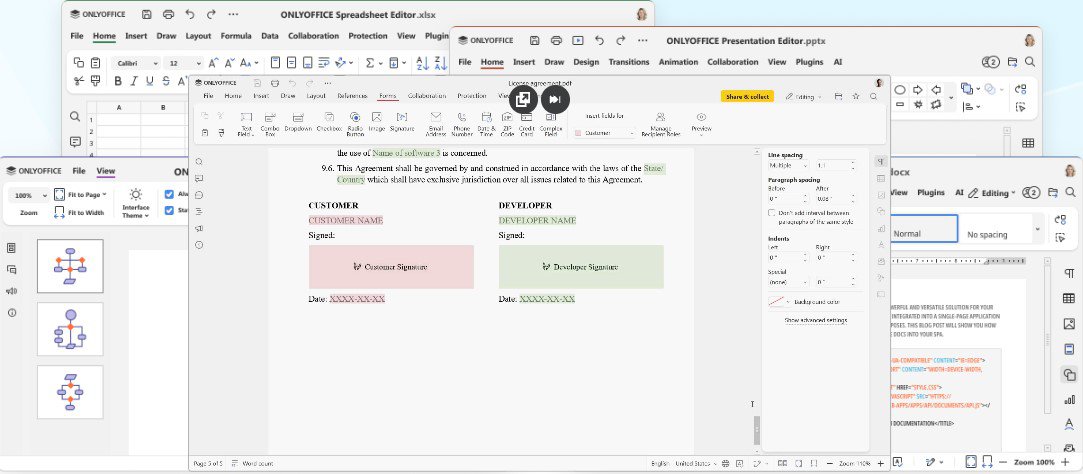
- Comprehensive Office Suite: Fully featured editors for documents, spreadsheets, presentations, and a robust PDF viewer and editor.
- High Format Compatibility: Native support and exceptional fidelity with Microsoft Office formats (DOCX, XLSX, PPTX) alongside OpenDocument standards.
- Cloud and Teamwork Integration: Seamlessly connect to ONLYOFFICE, Nextcloud, Seafile, and other cloud services for collaborative editing.
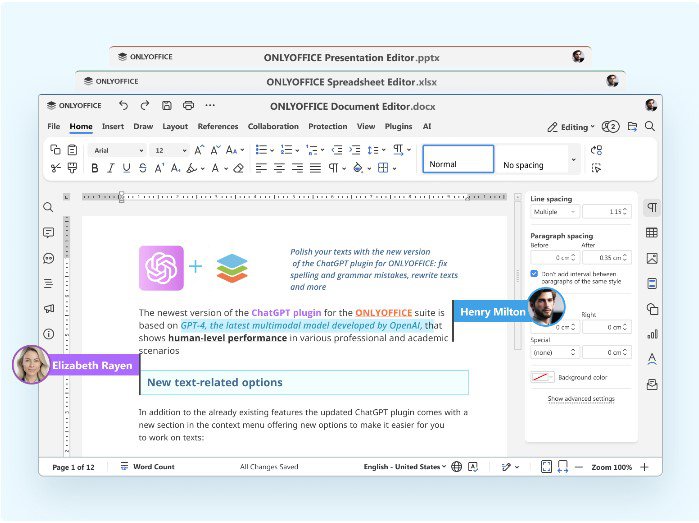
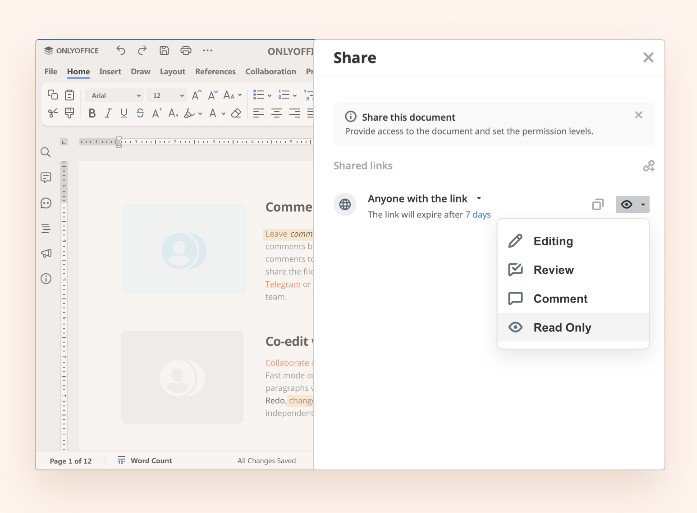
- Real-Time Co-Editing: Work together on documents with team members, leave comments, track changes, and use built-in chat.
- Extensible Plugin Ecosystem: Enhance functionality with integrated translation tools, bibliography managers, syntax highlighters, and AI assistants.
How to Install / Run
- 1Open your system's software center or package manager.
- 2Search for 'ONLYOFFICE Desktop Editors' in the application directory.
- 3Click Install and launch the office suite from your application menu once completed.
Advantages (Pros)
- Exceptional compatibility with Microsoft Office file formats
- Open-source AGPL-3.0 licensing for the community edition
- Powerful real-time collaboration features connected to cloud services
- Clean, modern tabbed user interface reducing clutter
Disadvantages (Cons)
- Higher RAM consumption due to Chromium framework backbone
- Enterprise features and scalability options require a paid commercial license
Description
ONLYOFFICE Desktop Editors is a powerful office suite developed by Ascensio System SIA, designed for creating, editing, and collaborating on text documents, spreadsheets, presentations, and PDFs. Built using the Chromium Embedded Framework, this desktop client combines maximum compatibility with popular Microsoft Office formats (DOCX, XLSX, PPTX) and an intuitive tabbed interface. It serves as an ideal solution for individuals, educational institutions, and enterprises looking for a robust, feature-rich productivity suite.
The application excels in collaboration workflows by allowing users to connect to cloud platforms such as ONLYOFFICE Workspace, Nextcloud, OwnCloud, or Seafile for seamless teamwork and real-time co-authoring. With a rich ecosystem of plugins, macro support, and advanced security options, ONLYOFFICE Desktop Editors delivers a professional-grade environment that streamlines document creation and enhances overall workflow efficiency across Windows, macOS, and Linux platforms.
Key Features
- Comprehensive Office Suite: Fully featured editors for documents, spreadsheets, presentations, and a robust PDF viewer and editor.
- High Format Compatibility: Native support and exceptional fidelity with Microsoft Office formats (DOCX, XLSX, PPTX) alongside OpenDocument standards.
- Cloud and Teamwork Integration: Seamlessly connect to ONLYOFFICE, Nextcloud, Seafile, and other cloud services for collaborative editing.
- Real-Time Co-Editing: Work together on documents with team members, leave comments, track changes, and use built-in chat.
- Extensible Plugin Ecosystem: Enhance functionality with integrated translation tools, bibliography managers, syntax highlighters, and AI assistants.
How to Install / Run
- 1Open your system's software center or package manager.
- 2Search for 'ONLYOFFICE Desktop Editors' in the application directory.
- 3Click Install and launch the office suite from your application menu once completed.
Advantages (Pros)
- Exceptional compatibility with Microsoft Office file formats
- Open-source AGPL-3.0 licensing for the community edition
- Powerful real-time collaboration features connected to cloud services
- Clean, modern tabbed user interface reducing clutter
Disadvantages (Cons)
- Higher RAM consumption due to Chromium framework backbone
- Enterprise features and scalability options require a paid commercial license
Description
ONLYOFFICE Desktop Editors is a powerful office suite developed by Ascensio System SIA, designed for creating, editing, and collaborating on text documents, spreadsheets, presentations, and PDFs. Built using the Chromium Embedded Framework, this desktop client combines maximum compatibility with popular Microsoft Office formats (DOCX, XLSX, PPTX) and an intuitive tabbed interface. It serves as an ideal solution for individuals, educational institutions, and enterprises looking for a robust, feature-rich productivity suite.
The application excels in collaboration workflows by allowing users to connect to cloud platforms such as ONLYOFFICE Workspace, Nextcloud, OwnCloud, or Seafile for seamless teamwork and real-time co-authoring. With a rich ecosystem of plugins, macro support, and advanced security options, ONLYOFFICE Desktop Editors delivers a professional-grade environment that streamlines document creation and enhances overall workflow efficiency across Windows, macOS, and Linux platforms.
Key Features
- Comprehensive Office Suite: Fully featured editors for documents, spreadsheets, presentations, and a robust PDF viewer and editor.
- High Format Compatibility: Native support and exceptional fidelity with Microsoft Office formats (DOCX, XLSX, PPTX) alongside OpenDocument standards.
- Cloud and Teamwork Integration: Seamlessly connect to ONLYOFFICE, Nextcloud, Seafile, and other cloud services for collaborative editing.
- Real-Time Co-Editing: Work together on documents with team members, leave comments, track changes, and use built-in chat.
- Extensible Plugin Ecosystem: Enhance functionality with integrated translation tools, bibliography managers, syntax highlighters, and AI assistants.
How to Install / Run
- 1Open your system's software center or package manager.
- 2Search for 'ONLYOFFICE Desktop Editors' in the application directory.
- 3Click Install and launch the office suite from your application menu once completed.
Advantages (Pros)
- Exceptional compatibility with Microsoft Office file formats
- Open-source AGPL-3.0 licensing for the community edition
- Powerful real-time collaboration features connected to cloud services
- Clean, modern tabbed user interface reducing clutter
Disadvantages (Cons)
- Higher RAM consumption due to Chromium framework backbone
- Enterprise features and scalability options require a paid commercial license
LICENSE PERMISSIONS & LEGAL REFERENCE
- Public Distribution Permission: OFFICIALLY PERMITTED TO REDISTRIBUTE (100% Legal Release)
(Guaranteed rights to freely download, copy, and share in unmodified form under open-source / freeware terms). - License Model & Status: GNU Affero General Public License v3.0 / Commercial Proprietary.
- Official Distribution Permission: Under the official ONLYOFFICE Desktop Editors license (AGPL-3.0-only / Proprietary), this software is free and permits unrestricted downloading and distribution.
- Official Project Homepage: https://www.onlyoffice.com.
- Exact License & Terms Link: https://www.gnu.org/licenses/agpl-3.0.html.
- Official License Registry (Alternative Legal Source): https://github.com/ONLYOFFICE/DesktopEditors.
Images
Similar / Other Versions
No similar torrents found.
Technical Specifications
- DeveloperAscensio System SIA
- Release Date19.05.2026
- Operating SystemWindows11108/8.17
- Architecture64-bit (x64)
- Release FormatSetup / Installer Portable
- Languages🌍🇱🇻🇷🇺🇬🇧🇺🇦🇩🇪🇫🇷
- Official Homepageonlyoffice.com
- filesView (1)
System Requirements
- Processor (CPU)2 GHz 64-bit processor
- Memory (RAM)2 GB
- Free Disk Space2 GB
- Graphics Card (GPU)Standard display (No dedicated GPU required)
Rating
None
Said thanks
📢 Advertisement[+]
Your text ad here!Grab this spot using your accumulated balance and get noticed.Want to be seen by everyone?Place your ad here using your site balance! The perfect spot to promote your releases, clan, or links.VPNMost people overpay for a VPN without realising it. CometVPN starts from just $1.89/month — same privacy, same security, same speeds as the big names. Just without the big price tag.
+ Add your advertisement
📂 files (1)
×
| Path | Size |
|---|---|
| DesktopEditors_x64.exe | 356.27 MB |
❮
×
![]()
❯
Share on Facebook
Choose the image you want to see in your Facebook post:
Choose which image you want to see in your Facebook post and click "Share this image":
 Screenshot 1
 Screenshot 2
 Screenshot 3
 Screenshot 4
Facebook will automatically load the selected image in your post preview!
Facebook will automatically load the chosen image in the post preview.
🌐 All Supported Languages 46
🇱🇻
Latvian
LAT
🇷🇺
Russian
RUS
🇬🇧
English
ENG
🇺🇦
Ukrainian
_UA
🇩🇪
German
_DE
🇫🇷
French
_FR
🇪🇸
Spanish
_ES
🇮🇹
Italian
_IT
🇵🇱
Polish
_PL
🇱🇹
Lithuanian
_LT
🇪🇪
Estonian
_EE
🇧🇬
Bulgarian
_BG
🇨🇿
Czech
_CS
🇩🇰
Danish
_DK
🇬🇷
Greek
_EL
🇮🇳
Hindi
_HI
🇳🇱
Dutch
_NL
🇭🇷
Croatian
_HR
🇮🇩
Indonesian
_ID
🇮🇱
Hebrew
_HE
🇯🇵
Japanese
_JA
🇪🇸
Catalan
_CA
🇰🇷
Korean
_KO
🇨🇳
Chinese
_ZH
🇲🇾
Malay
_MS
🇳🇴
Norwegian
_NO
🇮🇷
Persian
_FA
🇵🇹
Portuguese
_PT
🇷🇴
Romanian
_RO
🇷🇸
Serbian
_SR
🇸🇰
Slovak
_SK
🇸🇮
Slovenian
_SL
🇫🇮
Finnish
_FI
🇹🇷
Turkish
_TR
🇭🇺
Hungarian
_HU
🇻🇳
Vietnamese
_VI
🇸🇪
Swedish
_SE
🇪🇸
Basque
_EU
🇪🇸
Galician
_GL
🇦🇲
Armenian
_HY
🇦🇿
Azerbaijani
_AZ
🇧🇩
Bengali
_BN
🇬🇪
Georgian
_KA
🇮🇪
Irish
_GA
🇰🇿
Kazakh
_KK
🇧🇾
Belarusian
_BE
No matching languages found
Total supported languages: 46