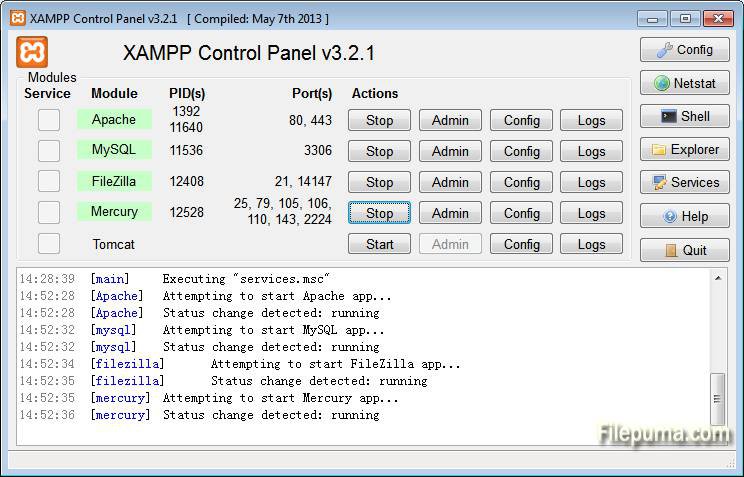
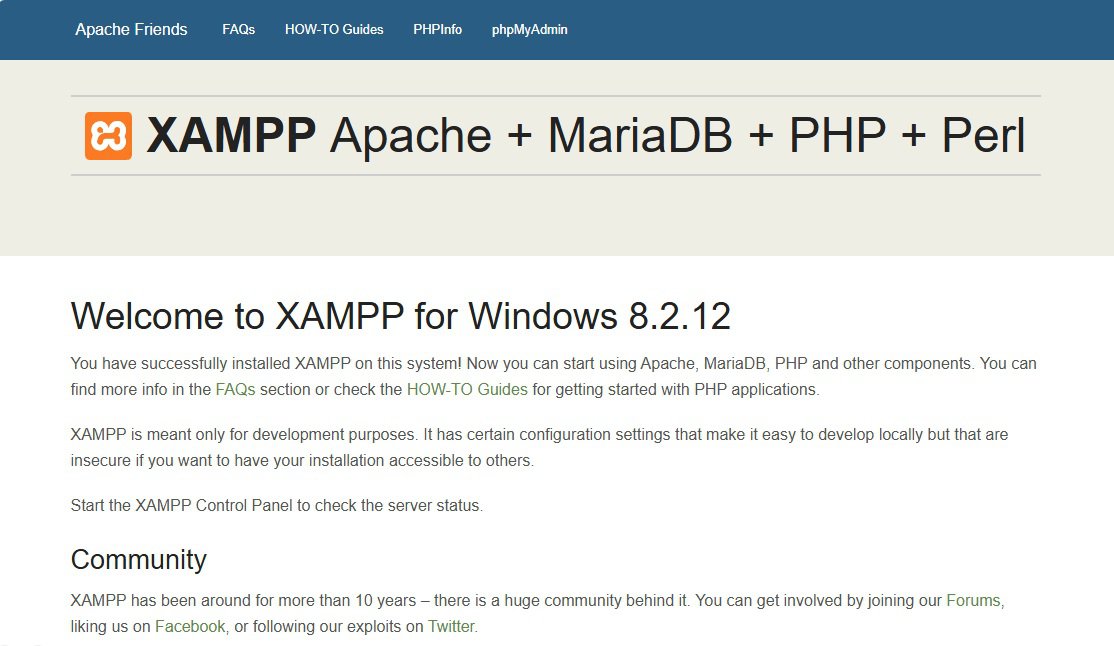
XAMPP ir bezmaksas un atvērtā pirmkoda vairāku platformu tīmekļa servera risinājumu komplekts, ko izstrādājis Apache Friends. Tas apvieno populārākos un nepieciešamākos rīkus vietējo tīmekļa lietotņu izstrādei, tostarp Apache HTTP serveri, MariaDB datu bāzi, kā arī PHP un Perl skriptu interpretus. Šis rīks ir ideāli piemērots izstrādātājiem, kuri vēlas ātri un bez sarežģījumiem izveidot pilnvērtīgu testēšanas vidi savā Windows datorā. Pateicoties integrētajam vadības panelim (Control Panel), lietotāji var viegli startēt, apturēt vai konfigurēt tādus pakalpojumus kā Apache, MySQL/MariaDB un FileZilla FTP serveris. Versija 8.2.12 piedāvā jaunākās PHP 8.2 funkcijas un veiktspējas uzlabojumus, nodrošinot mūsdienīgu vidi modernu satura vadības sistēmu, piemēram, WordPress, Joomla un Drupal, lokālai izstrādei un testēšanai pirms to publicēšanas tiešsaistes serverī.
Galvenās Funkcijas
Apache HTTP Serveris:Nodrošina stabilu un uzticamu pamatu tīmekļa lapu un lietotņu apkalpošanai lokālajā vidē.
MariaDB Datu bāze:Jaudīga un populāra MySQL alternatīva datu glabāšanai un pārvaldībai, izmantojot phpMyAdmin saskarni.
PHP 8.2 Atbalsts:Ietver jaunāko PHP interpreteru ar uzlabotu veiktspēju, jaunām sintakses iespējām un drošības labojumiem.
XAMPP Vadības panelis:Ērts grafiskais rīks visu instalēto servera pakalpojumu un moduļu centralizētai pārvaldīšanai.
Viegla Papildinājumu Instalēšana:Atbalsta ātru populāru web lietotņu un skriptu integrāciju, izmantojot Bitnami instalatorus.
How to Install / Run
1
Lejupielādējiet oficiālo XAMPP x64 VS16 instalācijas failu un palaidiet to savā datorā.
Pēc instalēšanas pabeigšanas atveriet XAMPP vadības paneli un startējiet Apache un MySQL pakalpojumus.
Plusi / Priekšrocības
Pilnīgi bezmaksas un atvērtā pirmkoda programmatūra bez lietošanas ierobežojumiem.
Ātra un vienkārša instalēšana Windows x64 vidē, kas neprasa sarežģītu manuālu konfigurāciju.
Ietver visus nepieciešamos komponentus (Apache, MariaDB, PHP) vienā integrētā paketē.
Lieliski piemērots gan iesācējiem, gan pieredzējušiem izstrādātājiem lokālai testēšanai.
Mīnusi / Ierobežojumi
Pēc noklusējuma nav pietiekami aizsargāts produkcijas (production) vidēm, paredzēts galvenokārt lokālai izstrādei.
Dažreiz antivīrusu programmatūra var bloķēt Apache vai MariaDB portus, prasot papildu izņēmumu iestatīšanu.
Описание
XAMPP — это бесплатный кроссплатформенный набор веб-серверного программного обеспечения с открытым исходным кодом, разработанный Apache Friends. Он включает в себя веб-сервер Apache, базу данных MariaDB, а также интерпретаторы языков программирования PHP и Perl. Пакет объединяет ключевые компоненты стека LAMP, что позволяет разработчикам быстро развернуть полноценную локальную среду для создания и тестирования динамических веб-приложений на компьютере под управлением Windows. Программа оснащена удобной панелью управления (Control Panel), которая дает возможность в один клик запускать, останавливать и настраивать такие службы, как Apache, MySQL/MariaDB и FTP-сервер. Версия 8.2.12 предоставляет все преимущества современной версии PHP 8.2, обеспечивая высокую производительность и совместимость с популярными системами управления контентом, включая WordPress, Joomla и Drupal.
Ключевые Особенности
Веб-сервер Apache:Обеспечивает стабильную и проверенную временем основу для хостинга и тестирования сайтов в локальной сети.
База данных MariaDB:Быстрая и масштабируемая реляционная база данных с удобным веб-интерфейсом phpMyAdmin для управления таблицами.
Поддержка PHP 8.2:Включает актуальный интерпретатор PHP с улучшенной производительностью, расширенными возможностями типизации и исправлениями безопасности.
Панель управления XAMPP:Интуитивно понятный графический интерфейс для мониторинга, запуска и конфигурации всех установленных сервисов.
Удобство развертывания:Позволяет быстро разворачивать популярные CMS и скрипты для локального тестирования перед их переносом на удаленный сервер.
How to Install / Run
1
Загрузите официальный установочный файл XAMPP для Windows x64 и запустите его.
2
Следуйте инструкциям мастера установки, выбрав желаемую папку и необходимые компоненты для инсталляции.
3
Откройте панель управления XAMPP после заверщения установки и нажмите кнопки 'Start' для запуска Apache и MySQL.
Преимущества (Плюсы)
Полностью бесплатный и открытый программный продукт без скрытых платежей и ограничений.
Быстрая и простая установка на ОС Windows x64 без необходимости сложной ручной настройки компонентов.
Все необходимые инструменты для веб-разработки (сервер, база данных, язык программирования) собраны в одном пакете.
Отлично подходит как для начинающих разработчиков, так и для профессионалов для отладки кода.
Недостатки (Минусы)
Конфигурация по умолчанию оптимизирована для локальной разработки и не защищена для полноценного использования в сети интернет.
Некоторые сторонние антивирусы могут блокировать порты Apache или MariaDB, требуя добавления в исключения.
Description
XAMPP is a free and open-source cross-platform web server solution stack package developed by Apache Friends, consisting mainly of the Apache HTTP Server, MariaDB database, and interpreters for scripts written in the PHP and Perl programming languages. By bundling the core components of the LAMP stack, XAMPP simplifies the process of setting up a local development environment, making the transition from a local test server to a live production server much smoother and more efficient. The software features an intuitive control panel that allows developers to easily manage services like Apache, MySQL/MariaDB, and FileZilla with a single click. Version 8.2.12 brings the power and modern capabilities of PHP 8.2 to the Windows x64 platform, enabling seamless local hosting for popular content management systems such as WordPress, Joomla!, and Drupal, as well as custom web applications.
Key Features
Apache HTTP Server:Provides a robust and industry-standard web server environment to test and run web applications locally.
MariaDB Database Support:Offers a fast, reliable, and scalable relational database management system managed easily via phpMyAdmin.
PHP 8.2 Integration:Includes the modern PHP interpreter delivering enhanced performance, strict typing features, and modern syntax support.
XAMPP Control Panel:A centralized graphical interface to start, stop, monitor, and configure individual server components and logs.
Simplified Application Deployment:Allows quick integration of popular web applications and tools through compatible Bitnami modules.
How to Install / Run
1
Download the official XAMPP x64 installer executable and run it with administrator privileges.
2
Follow the setup wizard steps, selecting your preferred installation directory and required components.
3
Launch the XAMPP Control Panel upon completion and click 'Start' next to Apache and MySQL to begin testing.
Advantages (Pros)
Completely free and open-source solution with no licensing fees or feature restrictions.
Rapid out-of-the-box setup on Windows x64 systems without complex manual configuration steps.
Pre-configured integration between Apache, PHP, and MariaDB for immediate productivity.
Ideal environment for local web development, debugging, and offline testing.
Disadvantages (Cons)
Default security configurations are tailored for local testing and require hardening before any public deployment.
Antivirus or firewall software may occasionally interfere with server ports, requiring manual port exceptions.
Description
XAMPP is a free and open-source cross-platform web server solution stack package developed by Apache Friends, consisting mainly of the Apache HTTP Server, MariaDB database, and interpreters for scripts written in the PHP and Perl programming languages. By bundling the core components of the LAMP stack, XAMPP simplifies the process of setting up a local development environment, making the transition from a local test server to a live production server much smoother and more efficient. The software features an intuitive control panel that allows developers to easily manage services like Apache, MySQL/MariaDB, and FileZilla with a single click. Version 8.2.12 brings the power and modern capabilities of PHP 8.2 to the Windows x64 platform, enabling seamless local hosting for popular content management systems such as WordPress, Joomla!, and Drupal, as well as custom web applications.
Key Features
Apache HTTP Server:Provides a robust and industry-standard web server environment to test and run web applications locally.
MariaDB Database Support:Offers a fast, reliable, and scalable relational database management system managed easily via phpMyAdmin.
PHP 8.2 Integration:Includes the modern PHP interpreter delivering enhanced performance, strict typing features, and modern syntax support.
XAMPP Control Panel:A centralized graphical interface to start, stop, monitor, and configure individual server components and logs.
Simplified Application Deployment:Allows quick integration of popular web applications and tools through compatible Bitnami modules.
How to Install / Run
1
Download the official XAMPP x64 installer executable and run it with administrator privileges.
2
Follow the setup wizard steps, selecting your preferred installation directory and required components.
3
Launch the XAMPP Control Panel upon completion and click 'Start' next to Apache and MySQL to begin testing.
Advantages (Pros)
Completely free and open-source solution with no licensing fees or feature restrictions.
Rapid out-of-the-box setup on Windows x64 systems without complex manual configuration steps.
Pre-configured integration between Apache, PHP, and MariaDB for immediate productivity.
Ideal environment for local web development, debugging, and offline testing.
Disadvantages (Cons)
Default security configurations are tailored for local testing and require hardening before any public deployment.
Antivirus or firewall software may occasionally interfere with server ports, requiring manual port exceptions.
Description
XAMPP is a free and open-source cross-platform web server solution stack package developed by Apache Friends, consisting mainly of the Apache HTTP Server, MariaDB database, and interpreters for scripts written in the PHP and Perl programming languages. By bundling the core components of the LAMP stack, XAMPP simplifies the process of setting up a local development environment, making the transition from a local test server to a live production server much smoother and more efficient. The software features an intuitive control panel that allows developers to easily manage services like Apache, MySQL/MariaDB, and FileZilla with a single click. Version 8.2.12 brings the power and modern capabilities of PHP 8.2 to the Windows x64 platform, enabling seamless local hosting for popular content management systems such as WordPress, Joomla!, and Drupal, as well as custom web applications.
Key Features
Apache HTTP Server:Provides a robust and industry-standard web server environment to test and run web applications locally.
MariaDB Database Support:Offers a fast, reliable, and scalable relational database management system managed easily via phpMyAdmin.
PHP 8.2 Integration:Includes the modern PHP interpreter delivering enhanced performance, strict typing features, and modern syntax support.
XAMPP Control Panel:A centralized graphical interface to start, stop, monitor, and configure individual server components and logs.
Simplified Application Deployment:Allows quick integration of popular web applications and tools through compatible Bitnami modules.
How to Install / Run
1
Download the official XAMPP x64 installer executable and run it with administrator privileges.
2
Follow the setup wizard steps, selecting your preferred installation directory and required components.
3
Launch the XAMPP Control Panel upon completion and click 'Start' next to Apache and MySQL to begin testing.
Advantages (Pros)
Completely free and open-source solution with no licensing fees or feature restrictions.
Rapid out-of-the-box setup on Windows x64 systems without complex manual configuration steps.
Pre-configured integration between Apache, PHP, and MariaDB for immediate productivity.
Ideal environment for local web development, debugging, and offline testing.
Disadvantages (Cons)
Default security configurations are tailored for local testing and require hardening before any public deployment.
Antivirus or firewall software may occasionally interfere with server ports, requiring manual port exceptions.
LICENSE PERMISSIONS & LEGAL REFERENCE
Public Distribution Permission:OFFICIALLY PERMITTED TO REDISTRIBUTE (100% Legal Release)
(Guaranteed rights to freely download, copy, and share in unmodified form under open-source / freeware terms).
License Model & Status:GNU General Public License.
Official Distribution Permission:Under the official XAMPP license (GNU General Public License), this software is free and permits unrestricted downloading and distribution.