
Title
Attention Anonymous User!Your download speed is severely restricted. Registered users download at full speed without waiting. Register now!

Opera v. 136.0.6008.80
Internet & Browsersv. 136.0.6008.80

Original Descriptions
🇱🇻Latvian
🇷🇺Russian
🇬🇧English
Instant Translation
🇩🇪Deutsch
🇪🇸Español
🇫🇷Français
🇪🇪Eesti
🇱🇹Lietuvių
🇵🇱Polski
🇺🇦Українська
🇮🇹Italiano
🇵🇹Português
🇫🇮Suomi
🇸🇪Svenska
🇳🇴Norsk
🇨🇳中文
🇯🇵日本語
Operating System
Windows
1110
Architecture
64-bit (x64)
Bezsaistes versija (Offline Installer)
Šis laidiens satur pilno bezsaistes instalācijas pakotni. Programmas uzstādīšanai nav nepieciešams aktīvs interneta savienojums un papildu failu lejupielāde instalēšanas laikā. Apraksts
Šis Opera pārlūkprogrammas izlaidums ir pilnīgs autonomais bezsaistes instalētājs (offline installer), kas ļauj veikt pilnīgu instalēšanu bez aktīva interneta savienojuma vai tiešsaistes lejupielādētāja nepieciešamības instalēšanas laikā. Opera apvieno jaudīgu un ātru Web dzinēju ar modernu interfeisu un uzlabotām drošības funkcijām, nodrošinot augstu veiktspēju un ērtu tīmekļa vietņu pārlūkošanu gan ikdienas darbam, gan izklaidei. Programmatūra piedāvā integrētus rīkus efektīvai multivides pārvaldīšanai un darbam ar cilnēm.
Pateicoties iebūvētajam reklāmu bloķētājam un bezmaksas virtuālajam privātajam tīklam (VPN), Opera nodrošina ievērojami ātrāku lapu ielādi un augstāku lietotāja datu privātuma līmeni. Pārlūkprogramma atbalsta plašu paplašinājumu klāstu, ļaujot personalizēt darba vidi atbilstoši personīgajām vajadzībām un nodrošinot sinhronizāciju starp dažādām ierīcēm.
Galvenās Funkcijas
- Pilns bezsaistes instalētājs: Ļauj uzstādīt pārlūkprogrammu bez nepieciešamības pēc aktīva interneta savienojuma instalēšanas brīdī.
- Iebūvēts reklāmu bloķētājs: Efektīvi likvidē traucējošas reklāmas un paātrina tīmekļa lapu ielādes ātrumu.
- Drošs un bezmaksas VPN: Palīdz aizsargāt privātumu un apiet ģeogrāfiskos ierobežojumus tiešsaistē.
- Integrētie ziņojumapmaiņas rīki: Ļauj ērti piekļūt populārākajiem tērzēšanas un saziņas rīkiem tieši no sānjoslas.
- Darbplūsmu un cilņu pārvaldība: Nodrošina elastīgu cilņu grupēšanu un darba telpu pielāgošanu produktivitātei.
How to Install / Run
- 1Lejupielādējiet Opera pilno bezsaistes instalēšanas pakotni savā 64 bitu Windows datorā.
- 2Palaidiet lejupielādēto iestatīšanas failu, neprasot aktīvu interneta savienojumu.
- 3Sekojiet ekrānā redzamajiem norādījumiem, lai pabeigtu uzstādīšanu un sāktu lietot pārlūkprogrammu.
Plusi / Priekšrocības
- Pilnībā autonoms bezsaistes instalēšanas process bez interneta atkarības
- Ātra un efektīva resursu izmantošana ar zemāku enerģijas patēriņu
- Lieliskas iebūvētās privātuma un drošības aizsardzības funkcijas
- Plaša lietotāja saskarnes un paplašinājumu pielāgojamība
Mīnusi / Ierobežojumi
- Daži paplašinājumi var prasīt papildu saderības pārbaudi
- Atmiņas patēriņš var palielināties, atverot lielu skaitu aktīvu cilņu
Автономная версия (Offline Installer)
Данный релиз содержит полный автономный офлайн-дистрибутив. Для установки программы не требуется подключение к интернету и дополнительная загрузка файлов. Описание
Этот выпуск браузера Opera представляет собой полноценный автономный оффлайн-установщик (offline installer), позволяющий выполнить полную установку без необходимости активного подключения к интернету или онлайн-загрузчика во время настройки. Opera сочетает в себе высокую производительность, современный дизайн и мощные инструменты безопасности для эффективного и комфортного серфинга в сети Интернет.
Благодаря встроенному блокировщику рекламы, режиму энергосбережения и бесплатному VPN-сервису, браузер обеспечивает надежную защиту личных данных и ускоряет загрузку веб-страниц. Удобная боковая панель с интегрированными мессенджерами и настраиваемыми рабочими пространствами делает многозадачность простой и интуитивно понятной.
Ключевые Особенности
- Автономный оффлайн-установщик: Позволяет произвести полную установку браузера без требования к активному интернет-соединению в процессе.
- Встроенный блокировщик рекламы: Устраняет навязчивые баннеры и скрипты отслеживания для ускорения загрузки сайтов.
- Бесплатный встроенный VPN: Повышает уровень конфиденциальности в сети и помогает обходить региональные ограничения.
- Управление рабочими пространствами: Позволяет упорядочить вкладки по тематическим категориям для удобной работы.
- Интеграция мессенджеров: Обеспечивает мгновенный доступ к популярным чатам и средствам связи прямо из интерфейса браузера.
How to Install / Run
- 1Загрузите полный автономный оффлайн-установщик Opera на свой 64-битный компьютер под управлением Windows.
- 2Запустите загруженный файл установки без необходимости подключения к интернету.
- 3Следуйте простым инструкциям на экране для завершения настройки и запуска интернет-обозревателя.
Преимущества (Плюсы)
- Полный оффлайн-установщик, не зависящий от сети во время процесса инсталляции
- Высокая скорость работы и эффективное потребление системных ресурсов
- Встроенные средства защиты конфиденциальности, включая VPN и блокировку рекламы
- Гибкие возможности кастомизации интерфейса и рабочих пространств
Недостатки (Минусы)
- Большое количество открытых вкладок и расширений может увеличить нагрузку на оперативную память
- Некоторые продвинутые функции требуют минимального времени на освоение
Offline Version (Offline Installer)
This release includes the complete standalone offline setup package. No internet connection or additional file downloads are required during installation. Description
This release of Opera is the full standalone offline installer, allowing complete installation without requiring an active internet connection or online web-downloader during setup. Opera is a feature-rich, high-performance web browser designed to deliver a fast, secure, and customizable browsing experience on Windows 64-bit systems. It integrates advanced modern web standards with unique workflow optimization tools to enhance everyday internet navigation.
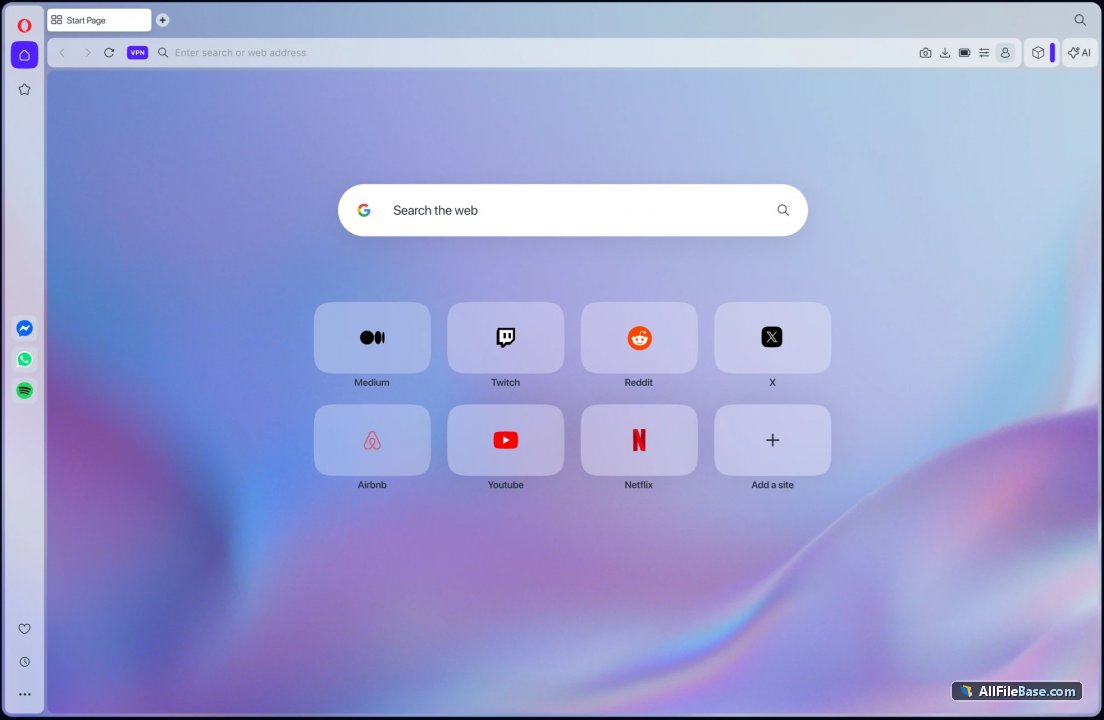
Equipped with a built-in ad blocker, battery saver mode, and a free privacy-focused VPN service, Opera ensures efficient resource usage and secure web browsing. The browser's intuitive sidebar hosts popular messaging apps and workspace management options, giving users a seamless multitasking environment tailored for modern digital needs.
Key Features
- Standalone Offline Installer: Enables complete browser setup without needing an active internet connection during installation.
- Built-in Ad Blocker: Blocks intrusive trackers and advertisements for faster page load times and cleaner web reading.
- Integrated Free VPN: Secures network traffic and enhances user privacy while browsing across various networks.
- Workspace and Tab Management: Organizes tabs into clean thematic groups and workspaces for better productivity.
- Sidebar Messaging Integration: Provides quick access to popular chat and communication apps directly within the browser interface.
How to Install / Run
- 1Download the Opera standalone offline installation setup package to your system.
- 2Execute the offline installer executable file without requiring an internet connection.
- 3Follow the straightforward on-screen instructions to complete the installation and launch Opera.
Advantages (Pros)
- Complete offline installation package with zero network dependency during setup
- Extremely fast rendering engine optimized for modern web standards
- Comprehensive built-in privacy tools including ad blocker and VPN
- Highly customizable workspace features and intuitive sidebar integration
Disadvantages (Cons)
- High number of active extensions may consume significant system memory
- Some unique UI elements may require a brief adaptation period for new users
Offline Version (Offline Installer)
This release includes the complete standalone offline setup package. No internet connection or additional file downloads are required during installation. Description
This release of Opera is the full standalone offline installer, allowing complete installation without requiring an active internet connection or online web-downloader during setup. Opera is a feature-rich, high-performance web browser designed to deliver a fast, secure, and customizable browsing experience on Windows 64-bit systems. It integrates advanced modern web standards with unique workflow optimization tools to enhance everyday internet navigation.
Equipped with a built-in ad blocker, battery saver mode, and a free privacy-focused VPN service, Opera ensures efficient resource usage and secure web browsing. The browser's intuitive sidebar hosts popular messaging apps and workspace management options, giving users a seamless multitasking environment tailored for modern digital needs.
Key Features
- Standalone Offline Installer: Enables complete browser setup without needing an active internet connection during installation.
- Built-in Ad Blocker: Blocks intrusive trackers and advertisements for faster page load times and cleaner web reading.
- Integrated Free VPN: Secures network traffic and enhances user privacy while browsing across various networks.
- Workspace and Tab Management: Organizes tabs into clean thematic groups and workspaces for better productivity.
- Sidebar Messaging Integration: Provides quick access to popular chat and communication apps directly within the browser interface.
How to Install / Run
- 1Download the Opera standalone offline installation setup package to your system.
- 2Execute the offline installer executable file without requiring an internet connection.
- 3Follow the straightforward on-screen instructions to complete the installation and launch Opera.
Advantages (Pros)
- Complete offline installation package with zero network dependency during setup
- Extremely fast rendering engine optimized for modern web standards
- Comprehensive built-in privacy tools including ad blocker and VPN
- Highly customizable workspace features and intuitive sidebar integration
Disadvantages (Cons)
- High number of active extensions may consume significant system memory
- Some unique UI elements may require a brief adaptation period for new users
Offline Version (Offline Installer)
This release includes the complete standalone offline setup package. No internet connection or additional file downloads are required during installation. Description
This release of Opera is the full standalone offline installer, allowing complete installation without requiring an active internet connection or online web-downloader during setup. Opera is a feature-rich, high-performance web browser designed to deliver a fast, secure, and customizable browsing experience on Windows 64-bit systems. It integrates advanced modern web standards with unique workflow optimization tools to enhance everyday internet navigation.
Equipped with a built-in ad blocker, battery saver mode, and a free privacy-focused VPN service, Opera ensures efficient resource usage and secure web browsing. The browser's intuitive sidebar hosts popular messaging apps and workspace management options, giving users a seamless multitasking environment tailored for modern digital needs.
Key Features
- Standalone Offline Installer: Enables complete browser setup without needing an active internet connection during installation.
- Built-in Ad Blocker: Blocks intrusive trackers and advertisements for faster page load times and cleaner web reading.
- Integrated Free VPN: Secures network traffic and enhances user privacy while browsing across various networks.
- Workspace and Tab Management: Organizes tabs into clean thematic groups and workspaces for better productivity.
- Sidebar Messaging Integration: Provides quick access to popular chat and communication apps directly within the browser interface.
How to Install / Run
- 1Download the Opera standalone offline installation setup package to your system.
- 2Execute the offline installer executable file without requiring an internet connection.
- 3Follow the straightforward on-screen instructions to complete the installation and launch Opera.
Advantages (Pros)
- Complete offline installation package with zero network dependency during setup
- Extremely fast rendering engine optimized for modern web standards
- Comprehensive built-in privacy tools including ad blocker and VPN
- Highly customizable workspace features and intuitive sidebar integration
Disadvantages (Cons)
- High number of active extensions may consume significant system memory
- Some unique UI elements may require a brief adaptation period for new users
LICENSE PERMISSIONS & LEGAL REFERENCE
- Public Distribution Permission: OFFICIALLY PERMITTED TO REDISTRIBUTE (100% Legal Release)
(Guaranteed rights to freely download, copy, and share in unmodified form under open-source / freeware terms). - License Model & Status: Opera License Agreement.
- Official Distribution Permission: Under the official Opera license (Freeware), this software is free and permits unrestricted downloading and distribution.
- Official Project Homepage: https://www.opera.com.
- Exact License & Terms Link: https://www.opera.com/terms.
- Official License Registry (Alternative Legal Source): https://www.opera.com.
Images
Similar / Other Versions
No similar torrents found.
Technical Specifications
- DeveloperOpera Norway AS
- Release Date29.09.2026
- Operating SystemWindows1110
- Architecture64-bit (x64)
- Release FormatSetup / Installer
- Languages🌍🇱🇻🇷🇺🇬🇧🇺🇦🇩🇪🇫🇷
- Official Homepageopera.com
- filesView (1)
System Requirements
- Processor (CPU)1 GHz or faster 64-bit processor
- Memory (RAM)2 GB
- Free Disk Space500 MB
- Graphics Card (GPU)Standard display (No dedicated GPU required)
Rating
None
Said thanks
📢 Advertisement[+]
Your text ad here!Grab this spot using your accumulated balance and get noticed.Want to be seen by everyone?Place your ad here using your site balance! The perfect spot to promote your releases, clan, or links.VPNMost people overpay for a VPN without realising it. CometVPN starts from just $1.89/month — same privacy, same security, same speeds as the big names. Just without the big price tag.
+ Add your advertisement
📂 files (1)
×
| Path | Size |
|---|---|
| Opera_136.0.6008.80_Setup_x64.exe | 133.21 MB |
❮
×
![]()
❯
Share on Facebook
Choose the image you want to see in your Facebook post:
Choose which image you want to see in your Facebook post and click "Share this image":
 Screenshot 1
 Screenshot 2
Facebook will automatically load the selected image in your post preview!
Facebook will automatically load the chosen image in the post preview.
🌐 All Supported Languages 63
🇿🇦
Afrikaans
AF
🇪🇹
Amharic
አማርኛ
AM
🇸🇦
Arabic
العربية
AR
🇦🇿
Azerbaijani
Azərbaycan
AZ
🇧🇬
Bulgarian
Български
BG
🇧🇩
Bengali
বাংলা
BN
🇧🇦
Bosnian
Bosanski
BS
🇪🇸
Catalan
Català
CA
🇨🇿
Czech
Čeština
CS
🇩🇰
Danish
Dansk
DA
🇩🇪
German
Deutsch
DE
🇬🇷
Greek
Ελληνικά
EL
🇬🇧
English
EN
🇪🇸
Spanish
Español
ES
🇪🇪
Estonian
Eesti
ET
🇮🇷
Persian
فارسی
FA
🇫🇮
Finnish
Suomi
FI
🇵🇭
Filipino
FIL
🇫🇷
French
Français
FR
🇮🇳
Gujarati
ગુજરાતી
GU
🇮🇱
Hebrew
עברית
HE
🇮🇳
Hindi
हिन्दी
HI
🇭🇷
Croatian
Hrvatski
HR
🇭🇺
Hungarian
Magyar
HU
🇮🇩
Indonesian
Bahasa Indonesia
ID
🇮🇹
Italian
Italiano
IT
🇯🇵
Japanese
日本語
JA
🇬🇪
Georgian
ქართული
KA
🇰🇿
Kazakh
Қазақша
KK
🇰🇭
Khmer
ភាសាខ្មែរ
KM
🇮🇳
Kannada
ಕನ್ನಡ
KN
🇰🇷
Korean
한국어
KO
🇱🇦
Lao
ລາວ
LO
🇱🇹
Lithuanian
Lietuvių
LT
🇱🇻
Latvian
Latviešu
LV
🇲🇰
Macedonian
Македонски
MK
🇮🇳
Malayalam
മലയാളം
ML
🇲🇳
Mongolian
Монгол
MN
🇮🇳
Marathi
मराठी
MR
🇲🇾
Malay
Bahasa Melayu
MS
🇲🇲
Burmese
မြန်မာ
MY
🇳🇴
Norwegian
Norsk
NO
🇳🇱
Dutch
Nederlands
NL
🇵🇱
Polish
Polski
PL
🇵🇹
Portuguese
Português
PT
🇷🇴
Romanian
Română
RO
🇷🇺
Russian
Русский
RU
🇱🇰
Sinhala
සිංහල
SI
🇸🇰
Slovak
Slovenčina
SK
🇸🇮
Slovenian
Slovenščina
SL
🇦🇱
Albanian
Shqip
SQ
🇷🇸
Serbian
Srpski
SR
🇸🇪
Swedish
Svenska
SV
🇰🇪
Swahili
Kiswahili
SW
🇮🇳
Tamil
தமிழ்
TA
🇮🇳
Telugu
తెలుగు
TE
🇹🇭
Thai
ไทย
TH
🇹🇷
Turkish
Türkçe
TR
🇺🇦
Ukrainian
Українська
UK
🇵🇰
Urdu
اردو
UR
🇺🇿
Uzbek
Oʻzbekcha
UZ
🇻🇳
Vietnamese
Tiếng Việt
VI
🇨🇳
Chinese
中文
ZH
No matching languages found
Total supported languages: 63