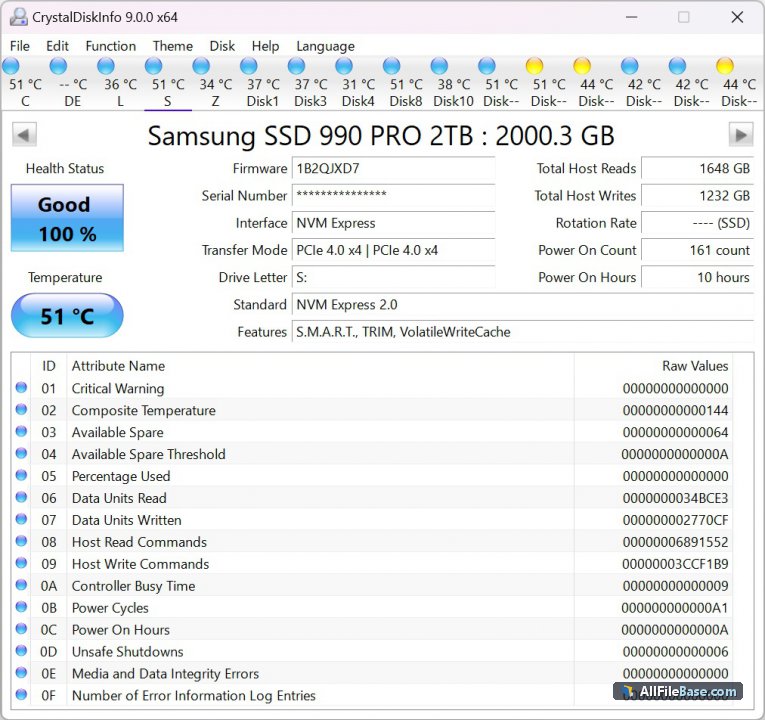
CrystalDiskInfo9 ir plaši atzīta un uzticama programmatūra cieto disku un SSD diskdziņu stāvokļa uzraudzībai, kas palīdz novērst datu zudumus, savlaicīgi brīdinot par aparatūras kļūmēm. Šī versija nodrošina pilnu atbalstu jaunākajām glabāšanas tehnoloģijām, tostarp NVMe, SATA un USB diskiem, sniedzot detalizētu informāciju par SMART parametriem, temperatūru un kopējo diska veselības stāvokli. Programma izceļas ar intuitīvu saskarni, pielāgojamiem brīdinājumu paziņojumiem un iespēju darboties fonā, nepārtraukti uzraugot datora krātuves drošību.
Izstrādātāja Noriyuki MIYAZAKI (hiyohiyo) radītais rīks ir neatsverams palīgs gan mājas lietotājiem, gan sistēmu administratoriem, kuri vēlas kontrolēt savu disku veiktspēju un novērst negaidītas kļūmes. CrystalDiskInfo atbalsta vairākas valodas, piedāvā dažādas vizuālās tēmas un nodrošina precīzu diagnostiku bez liekiem sarežģījumiem.
Galvenās Funkcijas
SMART uzraudzība:Reāllaika dati un diagnostika par cieto disku un SSD veselības rādītājiem.
Temperatūras kontrole:Iespēja iestatīt brīdinājumus par kritisku disku pārkaršanu.
Plašs disku atbalsts:Darbojas ar HDD, SSD, NVMe un ārējiem USB diskdziņiem.
Brīdinājumu sistēma:E-pasta un audio paziņojumi par iespējamām diska kļūmēm.
Vairākuvalodu interfeiss:Pilns atbalsts daudzām pasaules valodām ērtai lietošanai.
How to Install / Run
1
Atveriet oficiālo vietni vai lejupielādes avotu, lai iegūtu instalācijas failu.
2
Palaidiet lejupielādēto CrystalDiskInfo izpildāmo failu un apstipriniet instalēšanas vedni.
3
Pabeidziet iestatīšanu un palaidiet programmu, lai uzreiz apskatītu savu disku veselības stāvokli.
Plusi / Priekšrocības
Pilnīgi bezmaksas lietošanai gan mājās, gan uzņēmumos
Viegli saprotama veselības statusa indikācija (Labi, Uzmanību, Slikti)
Zems sistēmas resursu patēriņš fonā
Regulāri atjauninājumi un plaša sabiedrības uzticība
Mīnusi / Ierobežojumi
Nodrošina tikai diagnostiku un uzraudzību, bet nenovērš fiziskus bojājumus
Daži sarežģīti SMART parametri var būt neskaidri nepieredzējušiem lietotājiem
Описание
CrystalDiskInfo9 — это признанная во всем мире программа для мониторинга состояния жестких дисков и твердотельных накопителей, созданная для предотвращения потери данных и свовременного выявления аппаратных сбоев. Разработанная Нориюки Миядзаки (hiyohiyo), эта утилита считывает ключевые параметры SMART, отслеживает температуру накопителей и выводит предупреждения при ухудшении их работоспособности. Программа поддерживает современные интерфейсы, включая NVMe, SATA и внешние USB-диски, обеспечивая детальный контроль над состоянием дисковой подсистемы.
Интерфейс программы сочетает в себе простоту и информативность: цветовая индикация статуса позволяет мгновенно оценить здоровье диска, а фоновый режим работы гарантирует постоянную защиту данных без замедления работы системы. Гибкая настройка уведомлений и поддержка множества языков делают CrystalDiskInfo незаменимым инструментом как для обычных пользователей, так и для системных администраторов.
Ключевые Особенности
Мониторинг SMART:Глубокий анализ параметров здоровья и диагностика накопителей в реальном времени.
Контроль температуры:Отслеживание нагрева дисков с возможностью настройки критических порогов.
Поддержка стандартов:Полная совместимость с HDD, SSD, NVMe и внешними накопителями.
Система уведомлений:Оповещения по электронной почте и звуковые сигналы при обнаружении ошибок.
Многоязычный интерфейс:Поддержка большого количества языков для комфортной работы по всему миру.
How to Install / Run
1
Загрузите официальный установочный пакет CrystalDiskInfo из надежного источника.
2
Запустите скачанный исполняемый файл и следуйте инструкциям мастера установки.
3
Откройте приложение, чтобы просмотреть отчеты о состоянии дисков и настроить систему мониторинга.
Преимущества (Плюсы)
Бесплатное распространение для личного и коммерческого использования
Понятная цветовая индикация состояния (Хорошо, Тревога, Плохо)
Минимальное потребление системных ресурсов в фоновом режиме
Высокая надежность и признание экспертов по всему миру
Недостатки (Минусы)
Является исключительно диагностическим средством и не восстанавливает поврежденные блоки
Некоторые специфические параметры SMART могут требовать глубоких технических знаний
Description
CrystalDiskInfo9 is an industry-standard disk health monitoring utility designed to keep your HDD, SSD, and NVMe drives safe from unexpected failures and catastrophic data loss. Developed by Noriyuki MIYAZAKI (hiyohiyo), this advanced software reads S.M.A.R.T. parameters, tracks operational temperatures, and provides real-time alerts whenever drive metrics show signs of degradation. Its clean interface categorizes drives clearly with color-coded health statuses, making it accessible to everyday users while offering deep technical insights for IT professionals.
With extensive support for modern storage interfaces including SATA, USB, and high-speed NVMe protocols, CrystalDiskInfo operates efficiently in the background without burdening system resources. Users can customize warning thresholds, configure email or audio alerts, and monitor disk health continuously to ensure maximum data reliability and longevity across desktop and laptop computers.
Key Features
S.M.A.R.T. Monitoring:Comprehensive tracking and health evaluation of internal and external storage drives.
Temperature Alerts:Real-time temperature monitoring with customizable warning thresholds to prevent overheating.
Broad Hardware Support:Full compatibility with traditional HDDs, modern SSDs, and high-performance NVMe devices.
Advanced Notification System:Audio and email alerts triggered immediately when a drive encounters critical SMART errors.
Customizable Interface:Multilingual support and lightweight themes to fit any user preference.
How to Install / Run
1
Download the official CrystalDiskInfo setup package from trusted sources.
2
Run the installer executable and follow the on-screen setup instructions.
3
Launch the application to instantly view diagnostic reports and monitor your storage drives.
Advantages (Pros)
Completely free and open-source friendly utility for personal and commercial use
Clear color-coded health status indicators (Good, Caution, Bad)
Minimal system resource footprint during background monitoring
Trusted by millions of users and IT experts worldwide
Disadvantages (Cons)
Diagnostic tool only; cannot repair physical hardware failures or bad sectors
Certain obscure vendor-specific SMART attributes may require technical knowledge to interpret
Description
CrystalDiskInfo9 is an industry-standard disk health monitoring utility designed to keep your HDD, SSD, and NVMe drives safe from unexpected failures and catastrophic data loss. Developed by Noriyuki MIYAZAKI (hiyohiyo), this advanced software reads S.M.A.R.T. parameters, tracks operational temperatures, and provides real-time alerts whenever drive metrics show signs of degradation. Its clean interface categorizes drives clearly with color-coded health statuses, making it accessible to everyday users while offering deep technical insights for IT professionals.
With extensive support for modern storage interfaces including SATA, USB, and high-speed NVMe protocols, CrystalDiskInfo operates efficiently in the background without burdening system resources. Users can customize warning thresholds, configure email or audio alerts, and monitor disk health continuously to ensure maximum data reliability and longevity across desktop and laptop computers.
Key Features
S.M.A.R.T. Monitoring:Comprehensive tracking and health evaluation of internal and external storage drives.
Temperature Alerts:Real-time temperature monitoring with customizable warning thresholds to prevent overheating.
Broad Hardware Support:Full compatibility with traditional HDDs, modern SSDs, and high-performance NVMe devices.
Advanced Notification System:Audio and email alerts triggered immediately when a drive encounters critical SMART errors.
Customizable Interface:Multilingual support and lightweight themes to fit any user preference.
How to Install / Run
1
Download the official CrystalDiskInfo setup package from trusted sources.
2
Run the installer executable and follow the on-screen setup instructions.
3
Launch the application to instantly view diagnostic reports and monitor your storage drives.
Advantages (Pros)
Completely free and open-source friendly utility for personal and commercial use
Clear color-coded health status indicators (Good, Caution, Bad)
Minimal system resource footprint during background monitoring
Trusted by millions of users and IT experts worldwide
Disadvantages (Cons)
Diagnostic tool only; cannot repair physical hardware failures or bad sectors
Certain obscure vendor-specific SMART attributes may require technical knowledge to interpret
Description
CrystalDiskInfo9 is an industry-standard disk health monitoring utility designed to keep your HDD, SSD, and NVMe drives safe from unexpected failures and catastrophic data loss. Developed by Noriyuki MIYAZAKI (hiyohiyo), this advanced software reads S.M.A.R.T. parameters, tracks operational temperatures, and provides real-time alerts whenever drive metrics show signs of degradation. Its clean interface categorizes drives clearly with color-coded health statuses, making it accessible to everyday users while offering deep technical insights for IT professionals.
With extensive support for modern storage interfaces including SATA, USB, and high-speed NVMe protocols, CrystalDiskInfo operates efficiently in the background without burdening system resources. Users can customize warning thresholds, configure email or audio alerts, and monitor disk health continuously to ensure maximum data reliability and longevity across desktop and laptop computers.
Key Features
S.M.A.R.T. Monitoring:Comprehensive tracking and health evaluation of internal and external storage drives.
Temperature Alerts:Real-time temperature monitoring with customizable warning thresholds to prevent overheating.
Broad Hardware Support:Full compatibility with traditional HDDs, modern SSDs, and high-performance NVMe devices.
Advanced Notification System:Audio and email alerts triggered immediately when a drive encounters critical SMART errors.
Customizable Interface:Multilingual support and lightweight themes to fit any user preference.
How to Install / Run
1
Download the official CrystalDiskInfo setup package from trusted sources.
2
Run the installer executable and follow the on-screen setup instructions.
3
Launch the application to instantly view diagnostic reports and monitor your storage drives.
Advantages (Pros)
Completely free and open-source friendly utility for personal and commercial use
Clear color-coded health status indicators (Good, Caution, Bad)
Minimal system resource footprint during background monitoring
Trusted by millions of users and IT experts worldwide
Disadvantages (Cons)
Diagnostic tool only; cannot repair physical hardware failures or bad sectors
Certain obscure vendor-specific SMART attributes may require technical knowledge to interpret
LICENSE PERMISSIONS & LEGAL REFERENCE
Public Distribution Permission:OFFICIALLY PERMITTED TO REDISTRIBUTE (100% Legal Release)
(Guaranteed rights to freely download, copy, and share in unmodified form under open-source / freeware terms).
License Model & Status:MIT License / Free for personal and commercial use.
Official Distribution Permission:Under the official CrystalDiskInfo9 9 2 exe license (Freeware / Open Source), this software is free and permits unrestricted downloading and distribution.