
Title
Attention Anonymous User!Your download speed is severely restricted. Registered users download at full speed without waiting. Register now!

Picotorrent v. 0.25.0
Drivers & System Toolsv. 0.25.0

Original Descriptions
🇱🇻Latvian
🇷🇺Russian
🇬🇧English
Instant Translation
🇩🇪Deutsch
🇪🇸Español
🇫🇷Français
🇪🇪Eesti
🇱🇹Lietuvių
🇵🇱Polski
🇺🇦Українська
🇮🇹Italiano
🇵🇹Português
🇫🇮Suomi
🇸🇪Svenska
🇳🇴Norsk
🇨🇳中文
🇯🇵日本語
Operating System
Windows
1110
Architecture
64-bit (x64)
Apraksts
Picotorrent ir kompaks, straujš un bezmaksas BitTorrent klients, kas īpaši izstrādāts Windows operētājsistēmām. Tas izceļas ar savu minimālistisko interfeisu un augstu veiktspēju, piedāvājot lietotājiem efektīvu veidu failu lejupielādei un augšupielādei, izmantojot P2P (peer-to-peer) tīklus. Programmatūra ir veidota, izmantojot C++ un modernas Windows API tehnoloģijas, kas nodrošina minimālu sistēmas resursu patēriņu un zemu RAM aizņemamību pat aktīvu lejupielāžu laikā.
Pateicoties integrētajai libtorrent bibliotēkai, Picotorrent nodrošina stabilu un drošu savienojumu, atbalstot gan magnēta saites (magnet links), gan tradicionālos torrent failus, kā arī IPv6 un šifrēšanu. Tā ir lieliska izvēle tiem, kuri novērtē privātumu, ātrumu un nevēlas tērēt laiku nevajadzīgu uzpūstu funkciju apgūšanai, kas bieži sastopamas citos torrent klientos.
Galvenās Funkcijas
- Minimālistisks interfeiss: Tīrs un vienkāršs lietotāja interfeiss, kas koncentrējas uz būtisko bez liekiem reklāmu logiem.
- Zems resursu patēriņš: Pateicoties C++ arhitektūrai, programma patērē minimālu CPU un operatīvās atmiņas apjomu.
- Libtorrent dzinējs: Izmanto jaudīgu un pārbaudītu libtorrent bibliotēku augstas veiktspējas un stabilitātes nodrošināšanai.
- Šifrēšana un drošība: Pilns savienojumu šifrēšanas atbalsts, lai aizsargātu lietotāja privātumu un apietu nevēlamu trafika ierobežošanu.
- Magnēta saišu atbalsts: Ātra torrentu pievienošana, izmantojot standarta magnēta saites tiešai lejupielādei.
How to Install / Run
- 1Lejupielādējiet Picotorrent instalācijas pakotni no oficiālā avota.
- 2Palaidiet instalācijas failu un izpildiet ekrānā redzamos norādījumus.
- 3Atveriet programmu un pievienojiet savu pirmo torrent failu vai magnēta saiti.
Plusi / Priekšrocības
- Pilnīgi bezmaksas un atvērtā pirmkoda programmatūra bez reklāmām
- Ātra palaišana un ļoti mazs instalācijas izmērs
- Lieliski integrējas Windows vides dizainā un struktūrā
- Zems CPU un RAM patēriņš fona darbībā
Mīnusi / Ierobežojumi
- Pieejams tikai operētājsistēmai Windows
- Nav papildu iebūvētu rīku, piemēram, mediju straumēšanas
- Nav tik plašu konfigurācijas opciju kā dažiem vecākiem konkurentiem
Описание
Picotorrent — это компактный, быстрый и бесплатный BitTorrent-клиент, специально разработанный для операционных систем Windows. Он отличается минималистичным интерфейсом и высокой производительностью, предлагая пользователям эффективный инструмент для скачивания и раздачи файлов через P2P-сети. Программа написана на C++ с использованием современных технологий Windows API, что гарантирует минимальное потребление системных ресурсов и низкий уровень использования оперативной памяти даже при интенсивных загрузках.
Благодаря встроенной библиотеке libtorrent, Picotorrent обеспечивает стабильное и безопасное соединение, поддерживая как magnet-ссылки, так и традиционные torrent-файлы, а также IPv6 и шифрование трафика. Это идеальный выбор для тех, кто ценит конфиденциальность, скорость и отсутствие лишних функций, часто перегружающих другие торрент-клиенты.
Ключевые Особенности
- Минималистичный интерфейс: Чистый и понятный пользовательский интерфейс без рекламы и лишних элементов.
- Низкое потребление ресурсов: Благодаря архитектуре C++ приложение потребляет минимум процессора и оперативной памяти.
- Движок Libtorrent: Использование проверенной библиотеки обеспечивает высокую производительность и стабильность соединений.
- Шифрование и безопасность: Полная поддержка шифрования для защиты конфиденциальности пользователей от провайдерских ограничений.
- Поддержка Magnet-ссылок: Быстрое добавление загрузок с помощью стандартных магнетик-ссылок.
How to Install / Run
- 1Загрузите установочный пакет Picotorrent из официального источника.
- 2Запустите скачанный файл и следуйте простым инструкциям установщика.
- 3Откройте программу и добавьте свой первый торрент-файл или magnet-ссылку.
Преимущества (Плюсы)
- Полностью бесплатное и с открытым исходным кодом ПО без рекламы
- Мгновенный запуск и очень малый размер установочного пакета
- Отличная нативная интеграция с окружением Windows
- Минимальная нагрузка на CPU и RAM в фоновом режиме
Недостатки (Минусы)
- Доступно исключительно для операционной системы Windows
- Отсутствуют расширенные функции вроде встроенного медиаплеера
- Меньше тонких настроек по сравнению с громоздкими аналогами
Description
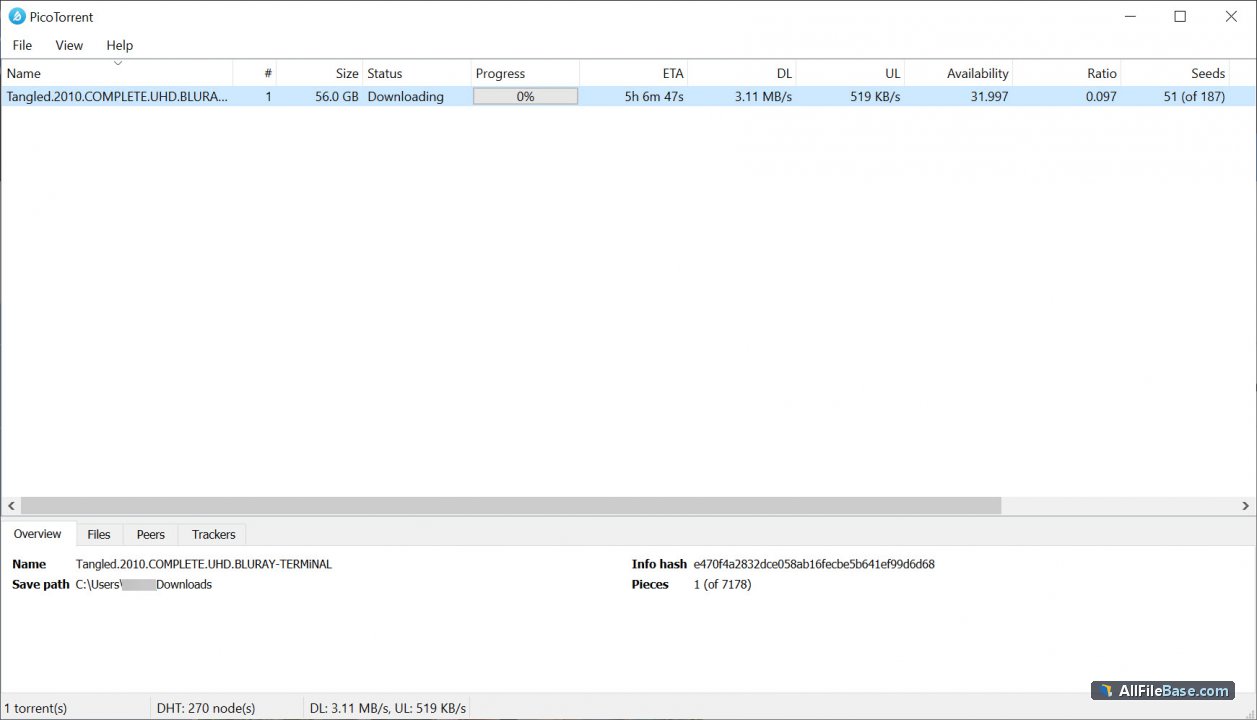
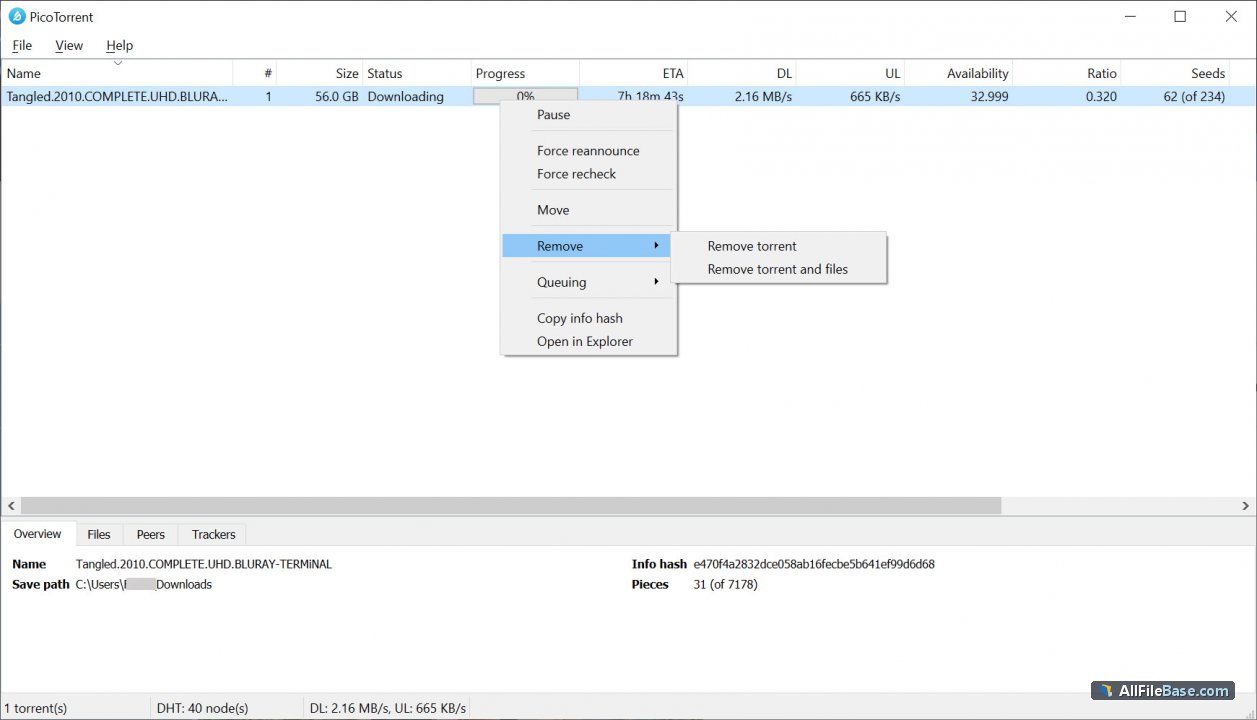
Picotorrent is a compact, fast, and free BitTorrent client specifically designed for Windows operating systems. It stands out with its minimalist interface and high performance, offering users an efficient way to download and upload files via P2P (peer-to-peer) networks. The software is built using C++ and modern Windows API technologies, ensuring minimal system resource consumption and low RAM usage even during heavy download tasks.
Powered by the robust libtorrent library, Picotorrent provides stable and secure connections, supporting both magnet links and traditional torrent files, as well as IPv6 and protocol encryption. It is an ideal choice for users who value privacy, speed, and simplicity without the bloatware and unnecessary features commonly found in other torrent clients.
Key Features
- Minimalist Interface: A clean and straightforward user interface focusing purely on essential torrent management tasks without ads.
- Low Resource Usage: Built with C++, the application consumes minimal CPU and RAM resources during operation.
- Libtorrent Engine: Powered by a robust and proven torrent library ensuring high performance and stable transfers.
- Encryption and Privacy: Full support for connection encryption to protect user privacy and avoid ISP throttling.
- Magnet Link Support: Quick and easy addition of downloads using standard magnet links.
How to Install / Run
- 1Download the Picotorrent installation package from the official repository.
- 2Run the installer executable and follow the simple on-screen setup prompts.
- 3Launch Picotorrent and start adding your torrent files or magnet links.
Advantages (Pros)
- Completely free and open-source software with no advertisements
- Lightning-fast startup and lightweight installation footprint
- Seamless native integration with the Windows operating system
- Extremely low CPU and RAM footprint during background tasks
Disadvantages (Cons)
- Available exclusively for the Windows platform
- Lacks advanced extra features like built-in media streaming
- Fewer granular configuration options compared to legacy clients
Description
Picotorrent is a compact, fast, and free BitTorrent client specifically designed for Windows operating systems. It stands out with its minimalist interface and high performance, offering users an efficient way to download and upload files via P2P (peer-to-peer) networks. The software is built using C++ and modern Windows API technologies, ensuring minimal system resource consumption and low RAM usage even during heavy download tasks.
Powered by the robust libtorrent library, Picotorrent provides stable and secure connections, supporting both magnet links and traditional torrent files, as well as IPv6 and protocol encryption. It is an ideal choice for users who value privacy, speed, and simplicity without the bloatware and unnecessary features commonly found in other torrent clients.
Key Features
- Minimalist Interface: A clean and straightforward user interface focusing purely on essential torrent management tasks without ads.
- Low Resource Usage: Built with C++, the application consumes minimal CPU and RAM resources during operation.
- Libtorrent Engine: Powered by a robust and proven torrent library ensuring high performance and stable transfers.
- Encryption and Privacy: Full support for connection encryption to protect user privacy and avoid ISP throttling.
- Magnet Link Support: Quick and easy addition of downloads using standard magnet links.
How to Install / Run
- 1Download the Picotorrent installation package from the official repository.
- 2Run the installer executable and follow the simple on-screen setup prompts.
- 3Launch Picotorrent and start adding your torrent files or magnet links.
Advantages (Pros)
- Completely free and open-source software with no advertisements
- Lightning-fast startup and lightweight installation footprint
- Seamless native integration with the Windows operating system
- Extremely low CPU and RAM footprint during background tasks
Disadvantages (Cons)
- Available exclusively for the Windows platform
- Lacks advanced extra features like built-in media streaming
- Fewer granular configuration options compared to legacy clients
Description
Picotorrent is a compact, fast, and free BitTorrent client specifically designed for Windows operating systems. It stands out with its minimalist interface and high performance, offering users an efficient way to download and upload files via P2P (peer-to-peer) networks. The software is built using C++ and modern Windows API technologies, ensuring minimal system resource consumption and low RAM usage even during heavy download tasks.
Powered by the robust libtorrent library, Picotorrent provides stable and secure connections, supporting both magnet links and traditional torrent files, as well as IPv6 and protocol encryption. It is an ideal choice for users who value privacy, speed, and simplicity without the bloatware and unnecessary features commonly found in other torrent clients.
Key Features
- Minimalist Interface: A clean and straightforward user interface focusing purely on essential torrent management tasks without ads.
- Low Resource Usage: Built with C++, the application consumes minimal CPU and RAM resources during operation.
- Libtorrent Engine: Powered by a robust and proven torrent library ensuring high performance and stable transfers.
- Encryption and Privacy: Full support for connection encryption to protect user privacy and avoid ISP throttling.
- Magnet Link Support: Quick and easy addition of downloads using standard magnet links.
How to Install / Run
- 1Download the Picotorrent installation package from the official repository.
- 2Run the installer executable and follow the simple on-screen setup prompts.
- 3Launch Picotorrent and start adding your torrent files or magnet links.
Advantages (Pros)
- Completely free and open-source software with no advertisements
- Lightning-fast startup and lightweight installation footprint
- Seamless native integration with the Windows operating system
- Extremely low CPU and RAM footprint during background tasks
Disadvantages (Cons)
- Available exclusively for the Windows platform
- Lacks advanced extra features like built-in media streaming
- Fewer granular configuration options compared to legacy clients
LICENSE PERMISSIONS & LEGAL REFERENCE
- Public Distribution Permission: OFFICIALLY PERMITTED TO REDISTRIBUTE (100% Legal Release)
(Guaranteed rights to freely download, copy, and share in unmodified form under open-source / freeware terms). - License Model & Status: MIT License.
- Official Distribution Permission: Under the official Picotorrent license (MIT), this software is free and permits unrestricted downloading and distribution.
- Official Project Homepage: https://picotorrent.org.
- Exact License & Terms Link: https://opensource.org/licenses/MIT.
- Official License Registry (Alternative Legal Source): https://opensource.org/licenses/MIT.
Images
Similar / Other Versions
No similar torrents found.
Technical Specifications
- DeveloperEltima LLC.
- Release Date14.05.2021
- Operating SystemWindows1110
- Architecture64-bit (x64)
- Release FormatSetup / Installer
- Languages🌍🇱🇻🇷🇺🇬🇧🇺🇦🇩🇪🇫🇷
- Official Homepagepicotorrent.org
- filesView (1)
System Requirements
- Processor (CPU)1 GHz or faster 64-bit processor
- Memory (RAM)1 GB
- Free Disk Space50 MB
- Graphics Card (GPU)Standard display (No dedicated GPU required)
Rating
None
Said thanks
📢 Advertisement[+]
Your text ad here!Grab this spot using your accumulated balance and get noticed.VPNMost people overpay for a VPN without realising it. CometVPN starts from just $1.89/month — same privacy, same security, same speeds as the big names. Just without the big price tag.Want to be seen by everyone?Place your ad here using your site balance! The perfect spot to promote your releases, clan, or links.
+ Add your advertisement
📂 files (1)
×
| Path | Size |
|---|---|
| picotorrent.exe | 5.12 MB |
❮
×
![]()
❯
Share on Facebook
Choose the image you want to see in your Facebook post:
Choose which image you want to see in your Facebook post and click "Share this image":
 Screenshot 1
 Screenshot 2
 Screenshot 3
 Screenshot 4
 Screenshot 5
Facebook will automatically load the selected image in your post preview!
Facebook will automatically load the chosen image in the post preview.
🌐 All Supported Languages 39
🇬🇧
English
EN
🇿🇦
Afrikaans
AF
🇸🇦
Arabic
العربية
AR
🇧🇬
Bulgarian
Български
BG
🇪🇸
Catalan
Català
CA
🇨🇿
Czech
Čeština
CS
🇩🇰
Danish
Dansk
DA
🇩🇪
German
Deutsch
DE
🇬🇷
Greek
Ελληνικά
EL
🇪🇸
Spanish
Español
ES
🇪🇪
Estonian
Eesti
ET
🇫🇮
Finnish
Suomi
FI
🇫🇷
French
Français
FR
🇮🇱
Hebrew
עברית
HE
🇮🇳
Hindi
हिन्दी
HI
🇭🇷
Croatian
Hrvatski
HR
🇭🇺
Hungarian
Magyar
HU
🇦🇲
Armenian
Հայերեն
HY
🇮🇩
Indonesian
Bahasa Indonesia
ID
🇮🇹
Italian
Italiano
IT
🇯🇵
Japanese
日本語
JA
🇬🇪
Georgian
ქართული
KA
🇰🇷
Korean
한국어
KO
🇱🇹
Lithuanian
Lietuvių
LT
🇱🇻
Latvian
Latviešu
LV
🇳🇴
Norwegian
Norsk
NO
🇳🇱
Dutch
Nederlands
NL
🇵🇱
Polish
Polski
PL
🇵🇹
Portuguese
Português
PT
🇷🇴
Romanian
Română
RO
🇷🇺
Russian
Русский
RU
🇱🇰
Sinhala
සිංහල
SI
🇸🇰
Slovak
Slovenčina
SK
🇷🇸
Serbian
Srpski
SR
🇸🇪
Swedish
Svenska
SV
🇹🇷
Turkish
Türkçe
TR
🇺🇦
Ukrainian
Українська
UK
🇻🇳
Vietnamese
Tiếng Việt
VI
🇨🇳
Chinese
中文
ZH
No matching languages found
Total supported languages: 39