
Title
Attention Anonymous User!Your download speed is severely restricted. Registered users download at full speed without waiting. Register now!

Kiwix v. 3.14.1
Internet & Browsersv. 3.14.1

Original Descriptions
🇱🇻Latvian
🇷🇺Russian
🇬🇧English
Instant Translation
🇩🇪Deutsch
🇪🇸Español
🇫🇷Français
🇪🇪Eesti
🇱🇹Lietuvių
🇵🇱Polski
🇺🇦Українська
🇮🇹Italiano
🇵🇹Português
🇫🇮Suomi
🇸🇪Svenska
🇳🇴Norsk
🇨🇳中文
🇯🇵日本語
Operating System
Windows
11108/8.17
Architecture
32-bit (x86)64-bit (x64)
Apraksts
Kiwix ir bezmaksas un atvērtā pirmkoda bezsaistes tīmekļa pārlūks, ko 2007. gadā izveidoja Emanuels Engelharts un Reno Godēns. Sākotnēji tas tika palaists, lai nodrošinātu piekļuvi Vikipēdijai bez interneta pieslēguma, taču laika gaitā tas ir paplašinājies, iekļaujot citus Wikimedia fonda projektus, publiskā domēna tekstus no Project Gutenberg, daudzas Stack Exchange vietnes un daudzus citus izglītojošus resursus. Programmatūra ir pieejama vairāk nekā 100 valodās un tiek plaši izmantota reģionos ar ierobežotu interneta piekļuvi vai tās neesamību. Pateicoties kompaktajam ZIM failu formātam, lietotāji var viegli lejupielādēt un glabāt veselas enciklopēdijas, datubāzes vai mācību materiālu krātuves savā datorā vai mobilajā ierīcē. Kiwix nodrošina ātru pilnteksta meklēšanu, grāmatzīmju pārvaldību un ērtu lietotāja saskarni, kas padara to par neaizstājamu rīku skolēniem, skolotājiem, ceļotājiem un humanitārās palīdzības organizācijām. Tā pilnībā autonomā darbība garantē privātumu, jo pārlūkošanas laikā netiek izsekoti lietotāja dati.
Galvenās Funkcijas
- Bezsaistes piekļuve saturam: Ļauj pārlūkot Wikipedia, Project Gutenberg un citus resursus bez interneta pieslēguma.
- ZIM failu atbalsts: Izmanto optimizētus un saspiestus ZIM arhīvus efektīvai datu glabāšanai un ātrai piekļuvei.
- Pilnteksta meklēšana: Nodrošināta ātra un precīza meklēšana lejupielādētajos datu krājumos.
- Vairāku valodu atbalsts: Pieejams lietošanai un saturam vairāk nekā 100 dažādās pasaules valodās.
- Pilnīga privātuma aizsardzība: Darbojas lokāli datorā vai ierīcē, neradot tīkla trafiku un neuzkrājot lietotāja darbību žurnālus.
How to Install / Run
- 1Atveriet lietotņu veikalu vai pakotņu pārvaldnieku savā sistēmā.
- 2Atrast Kiwix lietotni un noklikšķiniet uz instalēšanas pogas.
- 3Pēc instalēšanas palaidiet programmu un lejupielādējiet sev nepieciešamos ZIM satura failus.
Plusi / Priekšrocības
- Pilnīgi bezmaksas un atvērtā pirmkoda programmatūra bez slēptām maksām.
- Iespēja baudīt milzīgu informācijas apjomu vietās bez interneta vai ar augstām datu izmaksām.
- Viegla failu pārvaldība un ērta lietotāja saskarne dažādās operētājsistēmās.
- Augsts datu drošības un privātuma līmenis lokālās darbības dēļ.
Mīnusi / Ierobežojumi
- Pilnie datu krājumi (piemēram, Wikipedia ar attēliem) var aizņemt ļoti lielu vietu cietajā diskā.
- Lejupielādes process lieliem ZIM failiem var būt ilgs atkarībā no interneta ātruma.
Описание
Kiwix — это бесплатный офлайн-браузер с открытым исходным кодом, созданный Эммануэлем Энгельхартом и Рено Годеном в 2007 году. Изначально он был запущен для обеспечения автономного доступа к Википедии, но со временем расширился за счет других проектов Фонда Викимедиа, текстов общественного достояния из Проекта Гутенберг, множества сайтов Stack Exchange и других ресурсов. Доступный более чем на 100 языках, Kiwix используется в самых разных сферах — от образовательных инициатив в отдаленных регионах до гуманитарных проектов организации Bibliothèques Sans Frontières. Используя специальный сжатый формат файлов ZIM, Kiwix позволяет пользователям хранить целые репозитории знаний локально на своих компьютерах или мобильных устройствах. Приложение предоставляет мощный полнотекстовый поиск, закладки и интуитивно понятный интерфейс, делая его незаменимым инструментом для учебы, исследований и работы в условиях отсутствия интернета. Полная автономность работы гарантирует абсолютную конфиденциальность без какого-либо отслеживания данных.
Ключевые Особенности
- Офлайн-доступ к контенту: Просматривайте Википедию, Project Gutenberg и другие сайты без подключения к интернету.
- Поддержка формата ZIM: Использование высокоэффективных сжатых архивов для компактного хранения огромных объемов информации.
- Полнотекстовый поиск: Быстрый поиск нужной информации по всем загруженным базам данных.
- Многоязычность: Интерфейс и контент доступны более чем на 100 языках мира.
- Полная конфиденциальность: Приложение работает локально на устройстве, не передавая данные в сеть и не собирая телеметрию.
How to Install / Run
- 1Откройте менеджер пакетов или магазин приложений вашей операционной системы.
- 2Найдите приложение Kiwix и нажмите кнопку установки.
- 3Запустите программу и скачайте необходимые ZIM-файлы с контентом для начала работы.
Преимущества (Плюсы)
- Полностью бесплатное программное обеспечение с открытым исходным кодом без рекламы.
- Доступ к колоссальным объемам знаний в местах с плохим интернетом или его отсутствием.
- Кроссплатформенность и высокая производительность на различных типах устройств.
- Максимальный уровень безопасности и защиты личных данных благодаря офлайн-архитектуре.
Недостатки (Минусы)
- Полные версии баз данных (например, Википедия с картинками) требуют много свободного места на диске.
- Загрузка объемных ZIM-файлов может занять много времени при медленном соединении.
Description
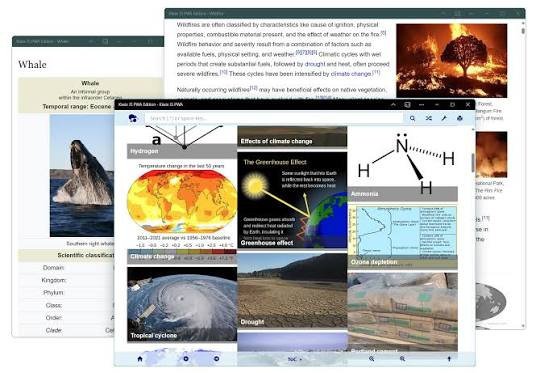
Kiwix is an open‑source application that enables offline access to ZIM files, allowing users to browse Wikipedia, Wikiquote and many other digital collections without an internet connection. Its clean, user‑friendly interface lets you search, bookmark, and navigate large knowledge bases quickly on Windows 64‑bit systems. Ideal for educational environments, remote areas, or travelers with limited connectivity, Kiwix provides a fast, searchable offline encyclopedia.
Key Features
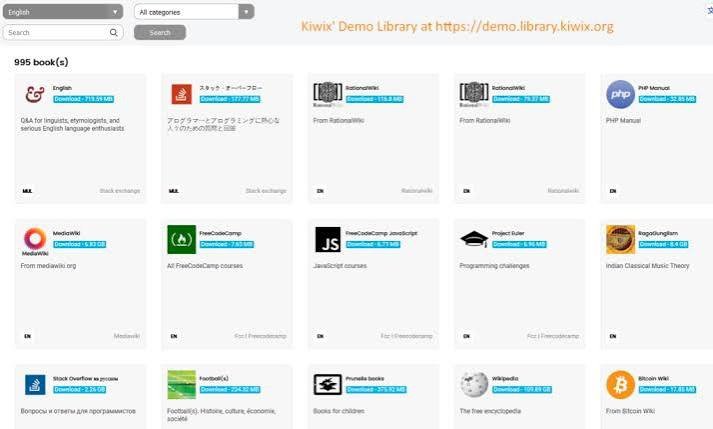
- Extensive ZIM Library: Supports thousands of ZIM archives, including full Wikipedia dumps, Wikiquote, and specialized collections.
- Instant Full‑Text Search: Powerful search engine with filters to locate information within seconds.
- Bookmarks & History: Save frequently visited pages and revisit previously viewed content effortlessly.
- Portable & Installer Versions: Use Kiwix as a traditional installer or a portable app from a USB drive.
- Extensible Plugins: Customize appearance and functionality with themes and optional add‑ons.
How to Install / Run
- 1Download the Windows installer from the official Kiwix website.
- 2Run the installer and follow the on‑screen prompts to complete the setup.
- 3Launch Kiwix, import or select a ZIM file, and start browsing offline.
Advantages (Pros)
- Completely offline access to a massive amount of knowledge.
- Free, open‑source, and regularly updated by the community.
- Lightweight and low‑resource, suitable for older hardware.
Disadvantages (Cons)
- Large ZIM files can consume significant disk space.
- Some newer features may have limited support on older Windows versions.
Description
Kiwix is an open‑source application that enables offline access to ZIM files, allowing users to browse Wikipedia, Wikiquote and many other digital collections without an internet connection. Its clean, user‑friendly interface lets you search, bookmark, and navigate large knowledge bases quickly on Windows 64‑bit systems. Ideal for educational environments, remote areas, or travelers with limited connectivity, Kiwix provides a fast, searchable offline encyclopedia.
Key Features
- Extensive ZIM Library: Supports thousands of ZIM archives, including full Wikipedia dumps, Wikiquote, and specialized collections.
- Instant Full‑Text Search: Powerful search engine with filters to locate information within seconds.
- Bookmarks & History: Save frequently visited pages and revisit previously viewed content effortlessly.
- Portable & Installer Versions: Use Kiwix as a traditional installer or a portable app from a USB drive.
- Extensible Plugins: Customize appearance and functionality with themes and optional add‑ons.
How to Install / Run
- 1Download the Windows installer from the official Kiwix website.
- 2Run the installer and follow the on‑screen prompts to complete the setup.
- 3Launch Kiwix, import or select a ZIM file, and start browsing offline.
Advantages (Pros)
- Completely offline access to a massive amount of knowledge.
- Free, open‑source, and regularly updated by the community.
- Lightweight and low‑resource, suitable for older hardware.
Disadvantages (Cons)
- Large ZIM files can consume significant disk space.
- Some newer features may have limited support on older Windows versions.
Description
Kiwix is an open‑source application that enables offline access to ZIM files, allowing users to browse Wikipedia, Wikiquote and many other digital collections without an internet connection. Its clean, user‑friendly interface lets you search, bookmark, and navigate large knowledge bases quickly on Windows 64‑bit systems. Ideal for educational environments, remote areas, or travelers with limited connectivity, Kiwix provides a fast, searchable offline encyclopedia.
Key Features
- Extensive ZIM Library: Supports thousands of ZIM archives, including full Wikipedia dumps, Wikiquote, and specialized collections.
- Instant Full‑Text Search: Powerful search engine with filters to locate information within seconds.
- Bookmarks & History: Save frequently visited pages and revisit previously viewed content effortlessly.
- Portable & Installer Versions: Use Kiwix as a traditional installer or a portable app from a USB drive.
- Extensible Plugins: Customize appearance and functionality with themes and optional add‑ons.
How to Install / Run
- 1Download the Windows installer from the official Kiwix website.
- 2Run the installer and follow the on‑screen prompts to complete the setup.
- 3Launch Kiwix, import or select a ZIM file, and start browsing offline.
Advantages (Pros)
- Completely offline access to a massive amount of knowledge.
- Free, open‑source, and regularly updated by the community.
- Lightweight and low‑resource, suitable for older hardware.
Disadvantages (Cons)
- Large ZIM files can consume significant disk space.
- Some newer features may have limited support on older Windows versions.
LICENSE PERMISSIONS & LEGAL REFERENCE
- Public Distribution Permission: OFFICIALLY PERMITTED TO REDISTRIBUTE (100% Legal Release)
(Guaranteed rights to freely download, copy, and share in unmodified form under open-source / freeware terms). - License Model & Status: GNU General Public License version 3.0.
- Official Distribution Permission: Under the official Kiwix license (GPLv3), this software is free and permits unrestricted downloading and distribution.
- Official Project Homepage: https://www.kiwix.org/.
- Exact License & Terms Link: https://www.gnu.org/licenses/gpl-3.0.html.
- Official License Registry (Alternative Legal Source): https://www.gnu.org/licenses/gpl-3.0.html.
Images
Similar / Other Versions
No similar torrents found.
Technical Specifications
- DeveloperEmmanuel Engelhart, Renaud Gaudin
- Release Date14.05.2026
- Operating SystemWindows11108/8.17
- Architecture32-bit (x86) 64-bit (x64)
- Release FormatSetup / Installer Portable
- Languages🌍🇷🇺🇬🇧🇺🇦🇩🇪🇫🇷🇪🇸
- Official Homepagekiwix.org
- filesView (1)
System Requirements
- Processor (CPU)1 GHz or faster
- Memory (RAM)1 GB
- Free Disk Space50 MB
- Graphics Card (GPU)Standard display (No dedicated GPU required)
Rating
None
Said thanks
📢 Advertisement[+]
Want to be seen by everyone?Place your ad here using your site balance! The perfect spot to promote your releases, clan, or links.Your text ad here!Grab this spot using your accumulated balance and get noticed.VPNMost people overpay for a VPN without realising it. CometVPN starts from just $1.89/month — same privacy, same security, same speeds as the big names. Just without the big price tag.
+ Add your advertisement
📂 files (1)
×
| Path | Size |
|---|---|
| kiwix-desktop_windows_x64_2.5.1 | 149.98 MB |
❮
×
![]()
❯
Share on Facebook
Choose the image you want to see in your Facebook post:
Choose which image you want to see in your Facebook post and click "Share this image":
 Screenshot 1
 Screenshot 2
 Screenshot 3
Facebook will automatically load the selected image in your post preview!
Facebook will automatically load the chosen image in the post preview.
🌐 All Supported Languages 44
🇸🇦
AR
🇧🇩
BN
🇫🇷
BR
🇪🇸
CA
🇨🇿
CS
🇩🇪
DE
🇩🇰
DK
🇬🇷
EL
🇬🇧
EN
🟢
EO
🇪🇸
ES
🇮🇷
FA
🇫🇮
FI
🇫🇷
FR
🇮🇱
HE
🇮🇳
HI
🇦🇲
HY
🇮🇩
ID
🇮🇹
IT
🇯🇵
JA
🇰🇷
KO
🇱🇺
LB
🇲🇰
MK
🇲🇾
MS
🇲🇲
MY
🇳🇱
NL
🇳🇴
NO
🇮🇳
OR
🇵🇱
PL
🇵🇹
PT
🇷🇴
RO
🇷🇺
RU
🇮🇹
SC
🇸🇪
SE
🇸🇰
SK
🇸🇮
SL
🇦🇱
SQ
🇷🇸
SR
🇮🇳
TA
🇮🇳
TE
🇹🇭
TH
🇹🇷
TR
🇺🇦
UA
🇨🇳
ZH
No matching languages found
Total supported languages: 44