
Title
Attention Anonymous User!Your download speed is severely restricted. Registered users download at full speed without waiting. Register now!

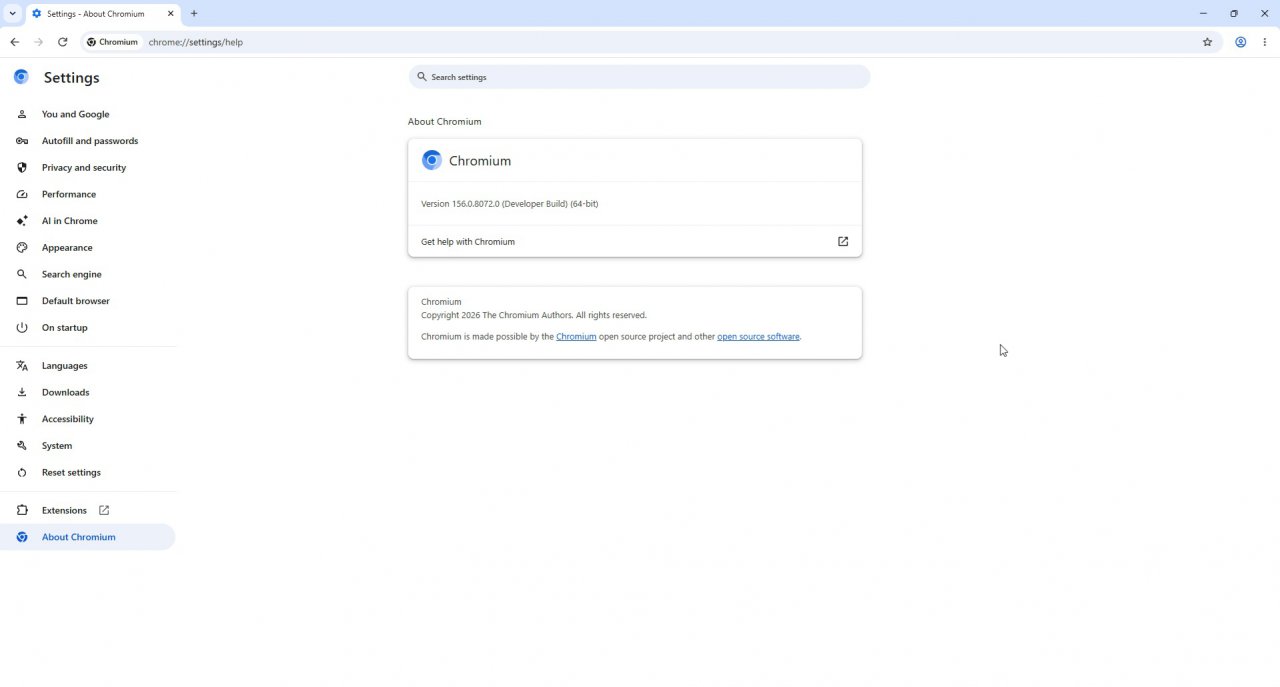
Chromium v. 156.0.8072.0
Internet & Browsersv. 156.0.8072.0

Original Descriptions
🇱🇻Latvian
🇷🇺Russian
🇬🇧English
Instant Translation
🇩🇪Deutsch
🇪🇸Español
🇫🇷Français
🇪🇪Eesti
🇱🇹Lietuvių
🇵🇱Polski
🇺🇦Українська
🇮🇹Italiano
🇵🇹Português
🇫🇮Suomi
🇸🇪Svenska
🇳🇴Norsk
🇨🇳中文
🇯🇵日本語
Operating System
Windows
1110
Architecture
64-bit (x64)
Apraksts
Chromium ir bezmaksas un atvērtā pirmkoda tīmekļa pārlūkprogrammas projekts, ko galvenokārt izstrādā un uztur Google. Tas kalpo kā pamats daudzām mūsdienu populārajām pārlūkprogrammām, tostarp Google Chrome, Microsoft Edge, Opera un citām. Projekts piedāvā ārkārtīgi ātru, drošu un uz standartiem balstītu vidi modernu tīmekļa lietotņu un vietņu izpildei.
Pateicoties savai modulārajai arhitektūrai un spēcīgajam Blink dzinējam, Chromium nodrošina augstu saderību ar jaunākajiem HTML5, CSS un JavaScript standartiem. Izstrādātāji un pieredzējuši lietotāji novērtē tā caurskatāmību, paplašināmību un regulāros atjauninājumus, kas ievieš jaunas tehnoloģijas un uzlabo vispārējo sistēmas drošību.
Galvenās Funkcijas
- Augsta veiktspēja un ātrums: Izmanto jaudīgu JavaScript dzinēju un optimizētu renderēšanas sistēmu ātrai lapu ielādei.
- Atvērtā pirmkoda bāze: Nodrošina pilnīgu koda caurskatāmību un kalpo par pamatu lielākajai daļai moderno pārlūku.
- Paplašināmība: Pilnībā atbalsta plašu paplašinājumu un rīku klāstu no interneta veikaliem.
- Drošības tehnoloģijas: Ietver smilšu kastes (sandbox) arhitektūru un regulārus drošības ielāpus aizsardzībai pret ļaunprātīgu programmatūru.
- Standartu atbalsts: Nodrošina visaptverošu jaunāko tīmekļa tehnoloģiju un API atbalstu izstrādātājiem.
How to Install / Run
- 1Lejupielādējiet oficiālo instalācijas pakotni atbilstoši savai operētājsistēmai.
- 2Palaidiet instalēšanas rīku un izpildiet ekrānā redzamos norādījumus.
- 3Atveriet Chromium un pielāgojiet iestatījumus atbilstoši savām prasībām.
Plusi / Priekšrocības
- Izcils lapu ielādes un JavaScript izpildes ātrums
- Plaša ekosistēma un saderība ar citiem pārlūkiem
- Aktīva izstrādātāju kopiena un bieži atjauninājumi
Mīnusi / Ierobežojumi
- Var patērēt ievērojamu operatīvās atmiņas (RAM) apjomu
- Trūkst dažu slēgto Google Chrome patentēto pakalpojumu
Описание
Chromium — это свободный и открытый проект веб-браузера, который разрабатывается и поддерживается при ведущей роли Google. Он служит базовой кодовой базой для большинства современных браузеров, включая Google Chrome, Microsoft Edge, Opera и многие другие программные решения. Проект ориентирован на обеспечение высокой скорости работы, стабильности и безопасности при серфинге в сети.
Благодаря передовому движку рендеринга и поддержке актуальных веб-стандартов, Chromium гарантирует безупречную производительность сложных веб-приложений и сайтов. Открытый исходный код и модульная структура делают его идеальным инструментом как для повседневного использования, так и для веб-разработчиков, исследователей безопасности и создателей альтернативных браузеров.
Ключевые Особенности
- Высокая производительность: Быстрая загрузка страниц и мгновенное выполнение скриптов благодаря оптимизированным движкам.
- Открытый исходный код: Полная прозрачность кодовой базы и возможность свободного аудита.
- Широкая экосистема: Поддержка огромного количества расширений, тем оформления и веб-стандартов.
- Многоуровневая безопасность: Использование изолированных процессов (sandbox) для защиты операционной системы.
- Регулярные обновления: Постоянное внедрение новейших технологических улучшений и исправление уязвимостей.
How to Install / Run
- 1Загрузите официальный установочный пакет Chromium для вашей операционной системы.
- 2Запустите загруженный файл и следуйте инструкциям на экране для завершения установки.
- 3Откройте установленный браузер и выполните первичную настройку параметров.
Преимущества (Плюсы)
- Выдающаяся скорость работы и обработки JavaScript
- Надежная основа для множества популярных браузеров
- Активное сообщество разработчиков и постоянные улучшения
Недостатки (Минусы)
- Высокое потребление оперативной памяти при интенсивном использовании
- Отсутствие некоторых встроенных проприетарных сервисов Google Chrome
Description
Chromium is a free and open-source web browser project primarily developed and maintained by Google. It serves as the core codebase providing the foundational architecture for Google Chrome, Microsoft Edge, Opera, and many other modern web browsers and application frameworks. Designed with a focus on speed, stability, and security, it offers a clean and efficient browsing environment for everyday users and developers alike.
Equipped with advanced rendering engines and cutting-edge web standard support, Chromium enables seamless execution of complex web applications and modern websites. Its highly modular structure and open development model allow security researchers and developers to audit code, contribute improvements, and build customized web navigation solutions tailored to specific needs.
Key Features
- High-Performance Rendering: Powered by advanced rendering and JavaScript engines for rapid webpage loading and smooth interactivity.
- Open-Source Transparency: Fully accessible source code allowing developers to inspect, modify, and build upon the core platform.
- Extensive Compatibility: Supports a vast ecosystem of extensions, themes, and modern web development APIs.
- Robust Security Architecture: Features process isolation and sandbox security models to prevent malicious scripts from compromising the system.
- Frequent Updates: Regular releases incorporating the latest performance optimizations, bug fixes, and security enhancements.
How to Install / Run
- 1Download the official Chromium installation package for your platform.
- 2Run the installer executable and follow the on-screen prompts to complete setup.
- 3Launch Chromium from your application menu and configure your preferred settings.
Advantages (Pros)
- Lightning-fast page loading and execution speeds
- Serves as the foundation for the most popular modern browsers
- Highly customizable and transparent open-source architecture
Disadvantages (Cons)
- Can consume significant system memory (RAM) with multiple tabs open
- Lacks certain proprietary integrations found in Google Chrome
Description
Chromium is a free and open-source web browser project primarily developed and maintained by Google. It serves as the core codebase providing the foundational architecture for Google Chrome, Microsoft Edge, Opera, and many other modern web browsers and application frameworks. Designed with a focus on speed, stability, and security, it offers a clean and efficient browsing environment for everyday users and developers alike.
Equipped with advanced rendering engines and cutting-edge web standard support, Chromium enables seamless execution of complex web applications and modern websites. Its highly modular structure and open development model allow security researchers and developers to audit code, contribute improvements, and build customized web navigation solutions tailored to specific needs.
Key Features
- High-Performance Rendering: Powered by advanced rendering and JavaScript engines for rapid webpage loading and smooth interactivity.
- Open-Source Transparency: Fully accessible source code allowing developers to inspect, modify, and build upon the core platform.
- Extensive Compatibility: Supports a vast ecosystem of extensions, themes, and modern web development APIs.
- Robust Security Architecture: Features process isolation and sandbox security models to prevent malicious scripts from compromising the system.
- Frequent Updates: Regular releases incorporating the latest performance optimizations, bug fixes, and security enhancements.
How to Install / Run
- 1Download the official Chromium installation package for your platform.
- 2Run the installer executable and follow the on-screen prompts to complete setup.
- 3Launch Chromium from your application menu and configure your preferred settings.
Advantages (Pros)
- Lightning-fast page loading and execution speeds
- Serves as the foundation for the most popular modern browsers
- Highly customizable and transparent open-source architecture
Disadvantages (Cons)
- Can consume significant system memory (RAM) with multiple tabs open
- Lacks certain proprietary integrations found in Google Chrome
Description
Chromium is a free and open-source web browser project primarily developed and maintained by Google. It serves as the core codebase providing the foundational architecture for Google Chrome, Microsoft Edge, Opera, and many other modern web browsers and application frameworks. Designed with a focus on speed, stability, and security, it offers a clean and efficient browsing environment for everyday users and developers alike.
Equipped with advanced rendering engines and cutting-edge web standard support, Chromium enables seamless execution of complex web applications and modern websites. Its highly modular structure and open development model allow security researchers and developers to audit code, contribute improvements, and build customized web navigation solutions tailored to specific needs.
Key Features
- High-Performance Rendering: Powered by advanced rendering and JavaScript engines for rapid webpage loading and smooth interactivity.
- Open-Source Transparency: Fully accessible source code allowing developers to inspect, modify, and build upon the core platform.
- Extensive Compatibility: Supports a vast ecosystem of extensions, themes, and modern web development APIs.
- Robust Security Architecture: Features process isolation and sandbox security models to prevent malicious scripts from compromising the system.
- Frequent Updates: Regular releases incorporating the latest performance optimizations, bug fixes, and security enhancements.
How to Install / Run
- 1Download the official Chromium installation package for your platform.
- 2Run the installer executable and follow the on-screen prompts to complete setup.
- 3Launch Chromium from your application menu and configure your preferred settings.
Advantages (Pros)
- Lightning-fast page loading and execution speeds
- Serves as the foundation for the most popular modern browsers
- Highly customizable and transparent open-source architecture
Disadvantages (Cons)
- Can consume significant system memory (RAM) with multiple tabs open
- Lacks certain proprietary integrations found in Google Chrome
LICENSE PERMISSIONS & LEGAL REFERENCE
- Public Distribution Permission: OFFICIALLY PERMITTED TO REDISTRIBUTE (100% Legal Release)
(Guaranteed rights to freely download, copy, and share in unmodified form under open-source / freeware terms). - License Model & Status: BSD 3-Clause License and GNU Lesser General Public License.
- Official Distribution Permission: Under the official Chromium license (BSD-3-Clause / LGPL), this software is free and permits unrestricted downloading and distribution.
- Official Project Homepage: https://www.chromium.org.
- Exact License & Terms Link: https://www.chromium.org/Home/licensing.
- Official License Registry (Alternative Legal Source): https://www.chromium.org/Home/licensing.
Images
Similar / Other Versions
No similar torrents found.
Technical Specifications
- DeveloperThe Chromium Projects / Google
- Release Date25.09.2026
- Operating SystemWindows1110
- Architecture64-bit (x64)
- Release FormatSetup / Installer Archive (ZIP/RAR)
- Languages🌍🇱🇻🇷🇺🇬🇧🇺🇦🇩🇪🇫🇷
- Official Homepagechromium.org
- filesView (1)
System Requirements
- Processor (CPU)Intel Pentium 4 or later that's SSE2 capable / AMD Athlon 64 or later
- Memory (RAM)512 MB
- Free Disk Space350 MB
- Graphics Card (GPU)Standard display (No dedicated GPU required)
Rating
None
Said thanks
📢 Advertisement[+]
VPNMost people overpay for a VPN without realising it. CometVPN starts from just $1.89/month — same privacy, same security, same speeds as the big names. Just without the big price tag.Want to be seen by everyone?Place your ad here using your site balance! The perfect spot to promote your releases, clan, or links.Your text ad here!Grab this spot using your accumulated balance and get noticed.
+ Add your advertisement
📂 files (1)
×
| Path | Size |
|---|---|
| chrome-win-156.0.8072.0.zip | 341.52 MB |
❮
×
![]()
❯
Share on Facebook
Choose the image you want to see in your Facebook post:
Choose which image you want to see in your Facebook post and click "Share this image":
 Screenshot 1
 Screenshot 2
 Screenshot 3
Facebook will automatically load the selected image in your post preview!
Facebook will automatically load the chosen image in the post preview.
🌐 All Supported Languages 63
🇿🇦
AF
🇪🇹
AM
🇸🇦
AR
🇦🇿
AZ
🇧🇬
BG
🇧🇩
BN
🇧🇦
BS
🇪🇸
CA
🇨🇿
CS
🇩🇰
DA
🇩🇪
DE
🇬🇷
EL
🇬🇧
EN
🇪🇸
ES
🇪🇪
ET
🇮🇷
FA
🇫🇮
FI
🇵🇭
FIL
🇫🇷
FR
🇮🇳
GU
🇮🇱
HE
🇮🇳
HI
🇭🇷
HR
🇭🇺
HU
🇮🇩
ID
🇮🇹
IT
🇯🇵
JA
🇬🇪
KA
🇰🇿
KK
🇰🇭
KM
🇮🇳
KN
🇰🇷
KO
🇱🇦
LO
🇱🇹
LT
🇱🇻
LV
🇲🇰
MK
🇮🇳
ML
🇲🇳
MN
🇮🇳
MR
🇲🇾
MS
🇲🇲
MY
🇳🇴
NO
🇳🇱
NL
🇵🇱
PL
🇵🇹
PT
🇷🇴
RO
🇷🇺
RU
🇱🇰
SI
🇸🇰
SK
🇸🇮
SL
🇦🇱
SQ
🇷🇸
SR
🇸🇪
SV
🇰🇪
SW
🇮🇳
TA
🇮🇳
TE
🇹🇭
TH
🇹🇷
TR
🇺🇦
UK
🇵🇰
UR
🇺🇿
UZ
🇻🇳
VI
🇨🇳
ZH
No matching languages found
Total supported languages: 63