
Title
Attention Anonymous User!Your download speed is severely restricted. Registered users download at full speed without waiting. Register now!

Firefox v. 154.0.1
Internet & Browsersv. 154.0.1

Original Descriptions
🇱🇻Latvian
🇷🇺Russian
🇬🇧English
Instant Translation
🇩🇪Deutsch
🇪🇸Español
🇫🇷Français
🇪🇪Eesti
🇱🇹Lietuvių
🇵🇱Polski
🇺🇦Українська
🇮🇹Italiano
🇵🇹Português
🇫🇮Suomi
🇸🇪Svenska
🇳🇴Norsk
🇨🇳中文
🇯🇵日本語
Operating System
Windows
1110
Architecture
64-bit (x64)
Apraksts
Mozilla Firefox ir jaudīgs, bezmaksas un atvērtā pirmkoda tīmekļa pārlūkprogramma, ko izstrādājusi Mozilla Corporation. Tā izmanto uzticamo Gecko renderēšanas dzinēju, lai nodrošinātu ātru un standartiem atbilstošu tīmekļa lapu attēlošanu. Pārlūks piedāvā plašas personalizācijas iespējas, jaudīgu papildinājumu ekosistēmu un uzlabotus rīkus privātuma aizsardzībai, efektīvi bloķējot izsekošanas sīkfailus un trešo pušu skriptus.
Galvenās Funkcijas
- Uzlabota privātuma aizsardzība: Iebūvēta izsekošanas aizsardzība, kas automātiski bloķē kaitīgos skriptus un trešo pušu sīkfailus.
- Jaunākais Gecko dzinējs: Ātra un droša tīmekļa lapu renderēšana, kas pilnībā atbalsta mūsdienu interneta standartus.
- Plašas papildinājumu iespējas: Piekļuve tūkstošiem paplašinājumu un tēmu, lai pielāgotu pārlūku savām vajadzībām.
- Sinhronizācija starp ierīcēm: Ērta grāmatzīmju, paroļu un atvērto cilņu sinhronizācija, izmantojot Mozilla kontu.
- Attēls attēlā (Picture-in-Picture): Iespēja skatīties videoklipus peldošā logā, vienlaikus veicot citus darbus.
How to Install / Run
- 1Lejupielādējiet oficiālo instalācijas failu no Mozilla tīmekļa vietnes.
- 2Palaidiet lejupielādēto instalatoru un izpildiet ekrānā redzamos norādījumus.
- 3Atveriet Firefox un pielāgojiet savus iestatījumus drošai un ērtai interneta lietošanai.
Plusi / Priekšrocības
- Atvērtais pirmkods ar spēcīgu fokusu uz lietotāja privātumu
- Plašas pielāgošanas un paplašināšanas iespējas
- Lieliska savietojamība ar dažādām operētājsistēmām
- Zems sistēmas resursu patēriņš salīdzinājumā ar citiem pārlūkiem
Mīnusi / Ierobežojumi
- Atsevišķas tīmekļalapas var nebūt pilnībā optimizētas Gecko dzinējam
- Atmiņas patēriņš var palielināties, izmantojot lielu skaitu aktīvu cilņu un paplašinājumu
Описание
Mozilla Firefox — это бесплатный веб-браузер с открытым исходным кодом, разработанный Mozilla Corporation и использующий мощный движок Gecko для быстрого и безопасного отображения веб-страниц. Браузер предлагает передовые инструменты защиты конфиденциальности, богатую экосистему расширений для глубокой кастомизации и надежную синхронизацию между различными устройствами. Firefox обеспечивает высокую скорость работы и независимость от доминирующих на рынке платформ.
Ключевые Особенности
- Усиленная защита конфиденциальности: Встроенная блокировка трекеров, вредоносных скриптов и сторонних файлов cookie.
- Движок Gecko: Быстрый и надежный рендеринг веб-страниц с полной поддержкой современных веб-стандартов.
- Экосистема расширений: Доступ к тысячам дополнений и тем для настройки внешнего вида и функционала.
- Межплатформенная синхронизация: Синхронизация закладок, паролей и открытых вкладок через учетную запись Mozilla.
- Режим «Картинка в картинке»: Возможность просматривать видео в плавающем окне поверх других приложений.
How to Install / Run
- 1Загрузите официальный установщик с сайта разработчика.
- 2Запустите скачанный файл и следуйте инструкциям на экране.
- 3Откройте Firefox и настройте параметры безопасности и синхронизации под свои задачи.
Преимущества (Плюсы)
- Открытый исходный код и бескомпромиссная защита личных данных
- Огромные возможности настройки интерфейса и дополнений
- Независимый движок рендеринга
- Низкое потребление системных ресурсов при стандартной работе
Недостатки (Минусы)
- Редкие проблемы совместимости на специфических или устаревших сайтах
- Рост потребления оперативной памяти при открытии большого числа тяжелых вкладок
Description
Mozilla Firefox is a free and open-source web browser developed by the Mozilla Corporation, utilizing the robust Gecko rendering engine for fast and standard-compliant web browsing. It delivers comprehensive privacy controls, extensive customization options through a rich extension ecosystem, and advanced synchronization features across multiple platforms. Firefox remains a top choice for users seeking an independent, secure, and highly customizable alternative for daily web navigation.
Key Features
- Enhanced Privacy Protection: Built-in tracking protection that automatically blocks harmful scripts and third-party tracking cookies.
- Gecko Rendering Engine: High-performance and secure web page rendering fully supporting modern web standards.
- Extensive Add-on Ecosystem: Access to thousands of extensions and themes to tailor the browser interface and functionality.
- Cross-Device Synchronization: Seamlessly sync bookmarks, passwords, and open tabs across devices using a Mozilla account.
- Picture-in-Picture Mode: Watch videos in a floating, resizable window while continuing to work across other tabs.
How to Install / Run
- 1Download the official installer package from the authorized Mozilla source.
- 2Run the setup file and follow the on-screen instructions to complete the installation.
- 3Launch Firefox and configure your initial privacy and synchronization preferences.
Advantages (Pros)
- Open-source transparency with a strong commitment to user data privacy
- Highly customizable interface and rich extension library
- Independent rendering engine not tied to Chromium
- Cross-platform support with efficient resource management
Disadvantages (Cons)
- Some niche websites may occasionally encounter compatibility issues compared to Chromium-based alternatives
- High memory consumption when running numerous heavy extensions simultaneously
Description
Mozilla Firefox is a free and open-source web browser developed by the Mozilla Corporation, utilizing the robust Gecko rendering engine for fast and standard-compliant web browsing. It delivers comprehensive privacy controls, extensive customization options through a rich extension ecosystem, and advanced synchronization features across multiple platforms. Firefox remains a top choice for users seeking an independent, secure, and highly customizable alternative for daily web navigation.
Key Features
- Enhanced Privacy Protection: Built-in tracking protection that automatically blocks harmful scripts and third-party tracking cookies.
- Gecko Rendering Engine: High-performance and secure web page rendering fully supporting modern web standards.
- Extensive Add-on Ecosystem: Access to thousands of extensions and themes to tailor the browser interface and functionality.
- Cross-Device Synchronization: Seamlessly sync bookmarks, passwords, and open tabs across devices using a Mozilla account.
- Picture-in-Picture Mode: Watch videos in a floating, resizable window while continuing to work across other tabs.
How to Install / Run
- 1Download the official installer package from the authorized Mozilla source.
- 2Run the setup file and follow the on-screen instructions to complete the installation.
- 3Launch Firefox and configure your initial privacy and synchronization preferences.
Advantages (Pros)
- Open-source transparency with a strong commitment to user data privacy
- Highly customizable interface and rich extension library
- Independent rendering engine not tied to Chromium
- Cross-platform support with efficient resource management
Disadvantages (Cons)
- Some niche websites may occasionally encounter compatibility issues compared to Chromium-based alternatives
- High memory consumption when running numerous heavy extensions simultaneously
Description
Mozilla Firefox is a free and open-source web browser developed by the Mozilla Corporation, utilizing the robust Gecko rendering engine for fast and standard-compliant web browsing. It delivers comprehensive privacy controls, extensive customization options through a rich extension ecosystem, and advanced synchronization features across multiple platforms. Firefox remains a top choice for users seeking an independent, secure, and highly customizable alternative for daily web navigation.
Key Features
- Enhanced Privacy Protection: Built-in tracking protection that automatically blocks harmful scripts and third-party tracking cookies.
- Gecko Rendering Engine: High-performance and secure web page rendering fully supporting modern web standards.
- Extensive Add-on Ecosystem: Access to thousands of extensions and themes to tailor the browser interface and functionality.
- Cross-Device Synchronization: Seamlessly sync bookmarks, passwords, and open tabs across devices using a Mozilla account.
- Picture-in-Picture Mode: Watch videos in a floating, resizable window while continuing to work across other tabs.
How to Install / Run
- 1Download the official installer package from the authorized Mozilla source.
- 2Run the setup file and follow the on-screen instructions to complete the installation.
- 3Launch Firefox and configure your initial privacy and synchronization preferences.
Advantages (Pros)
- Open-source transparency with a strong commitment to user data privacy
- Highly customizable interface and rich extension library
- Independent rendering engine not tied to Chromium
- Cross-platform support with efficient resource management
Disadvantages (Cons)
- Some niche websites may occasionally encounter compatibility issues compared to Chromium-based alternatives
- High memory consumption when running numerous heavy extensions simultaneously
LICENSE PERMISSIONS & LEGAL REFERENCE
- Public Distribution Permission: OFFICIALLY PERMITTED TO REDISTRIBUTE (100% Legal Release)
(Guaranteed rights to freely download, copy, and share in unmodified form under open-source / freeware terms). - License Model & Status: Mozilla Public License 2.0.
- Official Distribution Permission: Under the official Firefox license (MPL 2.0), this software is free and permits unrestricted downloading and distribution.
- Official Project Homepage: https://www.mozilla.org.
- Exact License & Terms Link: https://www.mozilla.org/en-US/MPL/2.0/.
- Official License Registry (Alternative Legal Source): https://www.mozilla.org/en-US/MPL/2.0/.
Images
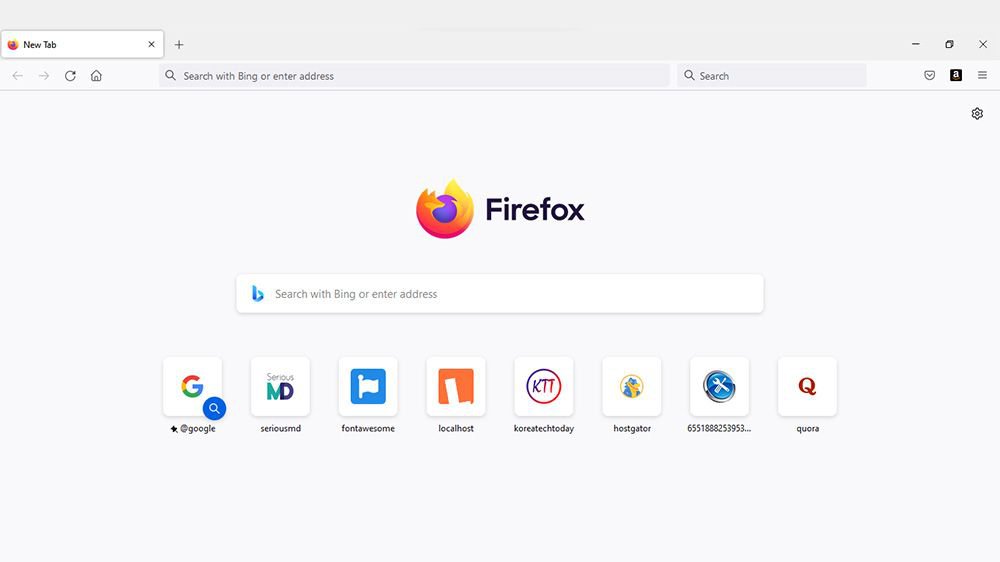
Video
Similar / Other Versions
No similar torrents found.
Technical Specifications
- DeveloperMozilla Corporation
- Release Date25.08.2026
- Operating SystemWindows1110
- Architecture64-bit (x64)
- Release FormatSetup / Installer Portable
- Languages🌍🇱🇻🇷🇺🇬🇧🇺🇦🇩🇪🇫🇷
- Official Homepagemozilla.org
- filesView (1)
System Requirements
- Processor (CPU)1.0 GHz or faster processor with SSE2 support
- Memory (RAM)2 GB
- Free Disk Space500 MB
- Graphics Card (GPU)Standard display (No dedicated GPU required)
Rating
None
Said thanks
📢 Advertisement[+]
Your text ad here!Grab this spot using your accumulated balance and get noticed.VPNMost people overpay for a VPN without realising it. CometVPN starts from just $1.89/month — same privacy, same security, same speeds as the big names. Just without the big price tag.Want to be seen by everyone?Place your ad here using your site balance! The perfect spot to promote your releases, clan, or links.
+ Add your advertisement
📂 files (1)
×
| Path | Size |
|---|---|
| Firefox Setup 154.0.1.exe | 88.00 MB |
❮
×
![]()
❯
Share on Facebook
Choose the image you want to see in your Facebook post:
Choose which image you want to see in your Facebook post and click "Share this image":
 Screenshot 1
 Screenshot 2
Facebook will automatically load the selected image in your post preview!
Facebook will automatically load the chosen image in the post preview.
🌐 All Supported Languages 84
🇿🇦
AF
🇪🇸
AN
🇸🇦
AR
🇪🇸
AST
🇦🇿
AZ
🇧🇾
BE
🇧🇬
BG
🇧🇩
BN
🇨🇳
BO
🇫🇷
BR
🇧🇦
BS
🇪🇸
CA
🇨🇿
CS
🏴
CY
🇩🇪
DE
🇩🇰
DK
🇩🇪
DSB
🇪🇪
EE
🇬🇷
EL
🇬🇧
EN
🟢
EO
🇪🇸
ES
🇪🇸
EU
🇮🇷
FA
🇫🇮
FI
🇵🇭
FIL
🇫🇷
FR
🇳🇱
FY
🇮🇪
GA
🏴
GD
🇪🇸
GL
🇮🇳
GU
🇮🇱
HE
🇮🇳
HI
🇭🇷
HR
🇩🇪
HSB
🇭🇺
HU
🇦🇲
HY
🇮🇩
ID
🇮🇸
IS
🇮🇹
IT
🇯🇵
JA
🇬🇪
KA
🇰🇿
KK
🇰🇭
KM
🇮🇳
KN
🇰🇷
KO
🇱🇦
LO
🇱🇹
LT
🇱🇻
LV
🇲🇰
MK
🇮🇳
ML
🇮🇳
MR
🇲🇾
MS
🇲🇲
MY
🇳🇵
NE
🇳🇱
NL
🇳🇴
NO
🇫🇷
OC
🇮🇳
OR
🇮🇳
PA
🇵🇱
PL
🇵🇹
PT
🇨🇭
RM
🇷🇴
RO
🇷🇺
RU
🇮🇹
SC
🇸🇪
SE
🇱🇰
SI
🇸🇰
SK
🇸🇮
SL
🇦🇱
SQ
🇷🇸
SR
🇮🇳
TA
🇮🇳
TE
🇹🇯
TG
🇹🇭
TH
🇹🇷
TR
🇺🇦
UA
🇵🇰
UR
🇺🇿
UZ
🇻🇳
VI
🇿🇦
XH
🇨🇳
ZH
No matching languages found
Total supported languages: 84