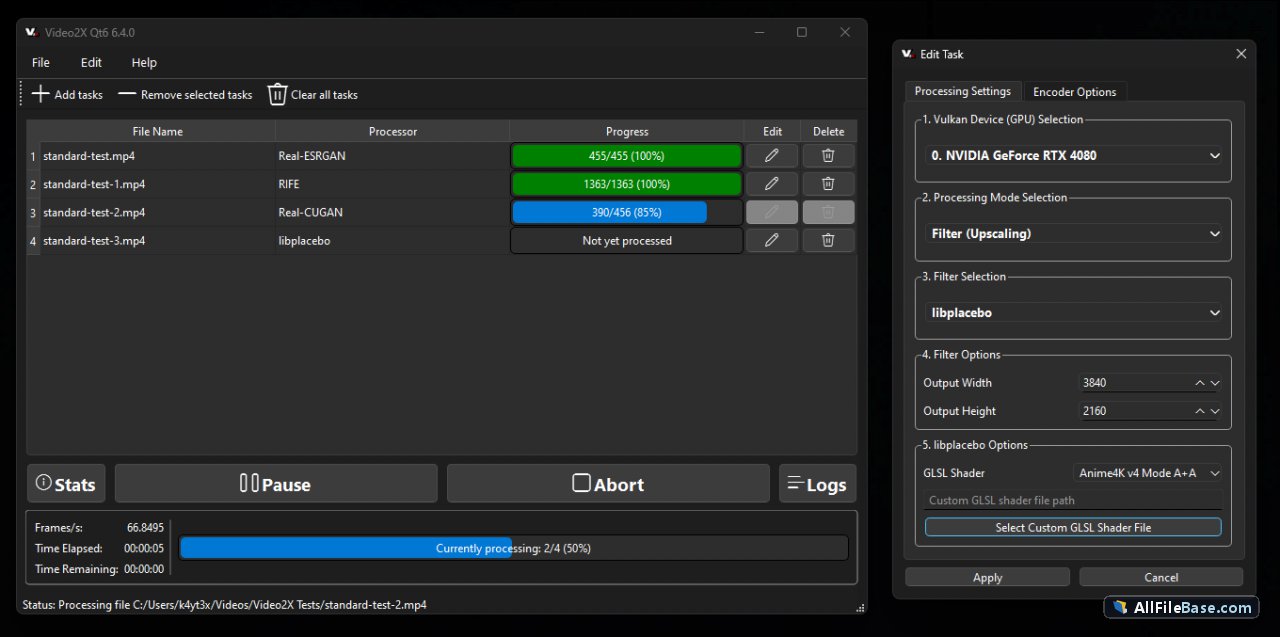
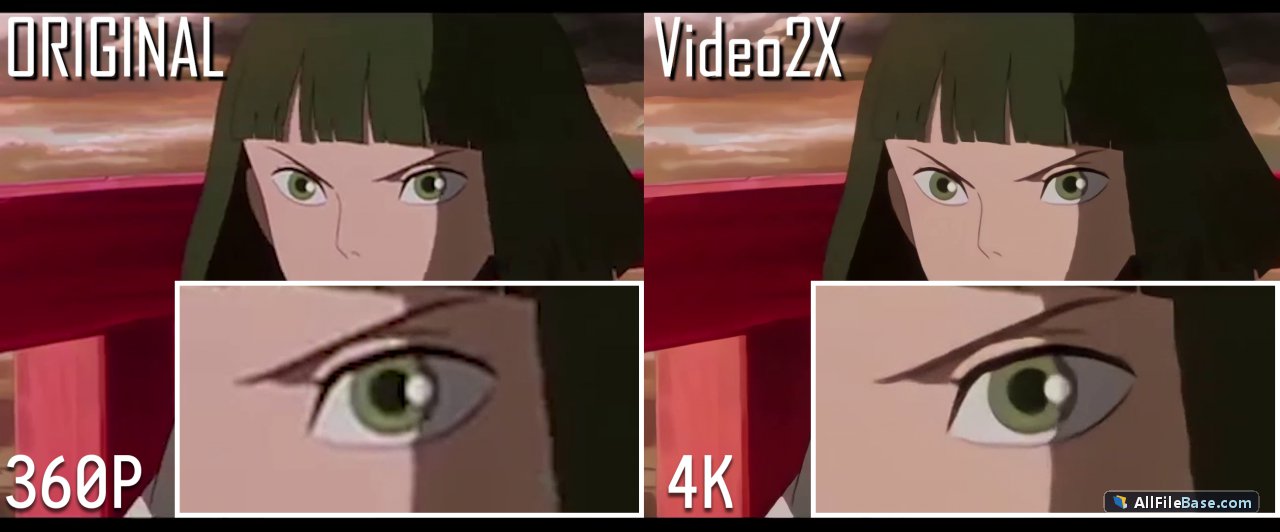
Video2X ir uzlabots, atklātā pirmkoda programmatūras rīks, kas paredzēts video failu, GIF un attēlu palielināšanai un uzlabošanai, izmantojot mašīnmācīšanos un mākslīgā intelekta algoritmus. Programmatūra integrē vairākus mūsdienīgus video apstrādes un superizšķirtspējas dzinējus, piemēram, RealESRGAN un Waifu2X, nodrošinot augstas kvalitātes malu izlīdzināšanu un detaļu atjaunošanu zemas izšķirtspējas materiāliem. Tā ir ideāli piemērota anime, retro videoklipu un digitālo arhīvu kvalitātes celšanai līdz mūsdienu HD un 4K standartiem.
Galvenās Funkcijas
AI satura palielināšana:Izmanto uzlabotus neironu tīklus, lai inteliģenti ģenerētu trūkstošos pikseļus un uzlabotu asumu.
Vairāki dzinēji:Atbalsta dažādus apstrādes dzinējus, tostarp RealESRGAN, Waifu2X un citi.
Komandrindas un grafiskā saskarne:Piedāvā elastīgas vadības iespējas gan pieredzējušiem lietotājiem, gan ikdienas lietotājiem.
Aparatūras paātrinājums:Pilnībā izmanto NVIDIA (CUDA), AMD un Intel grafisko karšu skaitļošanas jaudu.
Elastīga pakešu apstrāde:Ļauj rindā apstrādāt vairākus failus, ietaupot laiku lielu videoprojektu gadījumā.
How to Install / Run
1
Lejupielādējiet jaunāko Video2X instalācijas pakotni no oficiālās GitHub vietnes.
2
Palaidiet instalatoru un izpildiet ekrānā redzamos norādījumus, lai pabeigtu programmatūras uzstādīšanu.
3
Atveriet lietojotni, konfigurējiet vēlamos AI dzinēja iestatījumus un sāciet video apstrādi.
Plusi / Priekšrocības
Ievērojami uzlabo vecu vai zemas kvalitātes video materiālu asumu
Pilnībā bezmaksas un atklātā pirmkoda risinājums bez slēptiem maksājumiem
Aktīvi uzturēts projekts ar regulāriem atjauninājumiem un jaunu funkciju ieviešanu
Plaša aparatūras paātrinājuma saderība ar moderniem GPU
Mīnusi / Ierobežojumi
Nepieciešama jaudīga grafiskā karte (GPU) pieņemamam apstrādes ātrumam
Liels diska vietas patēriņš un ilgs renderēšanas laiks gariem video failiem
Описание
Video2X — это продвинутая программная утилита с открытым исходнымходом, предназначенная для апскейлинга и улучшения видеофайлов, GIF и изображений с использованием современных алгоритмов машинного обучения и искусственного интеллекта. Интегрируя передовые движки сверхвысокого разрешения, такие как RealESRGAN и Waifu2X, программа обеспечивает исключительную четкость контуров и восстановление деталей для материалов низкого разрешения. Она идеально подходит для ремастеринга аниме, ретро-видеозаписей и оцифрованных архивов до современных стандартов HD и 4K.
Ключевые Особенности
Масштабирование на базе ИИ:Использует передовые нейросети для интеллектуальной генерации недостающих пикселей и повышения четкости.
Множество движков обработки:Поддерживает различные бэкенды, включая RealESRGAN, Waifu2X и другие.
Аппаратное ускорение:Полностью задействует вычислительные мощности графических процессоров NVIDIA (CUDA), AMD и Intel.
Пакетная обработка:Позволяет ставить в очередь и обрабатывать несколько файлов одновременно для экономии времени.
Модульная архитектура:Обеспечивает легкую интеграцию новых моделей искусственного интеллекта и обновлений.
How to Install / Run
1
Загрузите последнюю версию установщика Video2X с официального репозитория GitHub.
2
Запустите исполняемый файл установщика и следуйте инструкциям мастера настройки.
3
Запустите приложение, настройте параметры выбранного ИИ-движка и приступите к обработке файлов.
Преимущества (Плюсы)
Существенно улучшает детализацию и качество старых или низкоразрешенных видео
Полностью бесплатное решение с открытым исходным кодом без водяных знаков
Активное сообщество разработчиков и регулярные обновления функционала
Надежная поддержка аппаратного ускорения за счет современных видеокарт
Недостатки (Минусы)
Требует наличия мощной дискретной видеокарты для приемскорости рендеринга
Высокие требования к дисковому пространству и времени обработки длинных видео
Description
Video2X is an advanced, open-source software utility designed to upscale and enhance video files, GIFs, and images using state-of-the-art machine learning and artificial intelligence algorithms. Integrating multiple leading super-resolution engines such as RealESRGAN and Waifu2X, the software delivers exceptional edge definition and detail restoration for low-resolution media. It is ideally suited for remastering anime, retro video footage, and digital archives to contemporary HD and 4K standards.
Key Features
AI-Powered Upscaling:Utilizes advanced neural networks to intelligently generate missing pixels and enhance overall visual clarity.
Multiple Processing Engines:Supports diverse backends including RealESRGAN, Waifu2X, and more for tailored enhancement.
Hardware Acceleration:Fully leverages NVIDIA (CUDA), AMD, and Intel GPU compute capabilities for accelerated rendering.
Batch Processing Support:Enables queuing and processing multiple files simultaneously to maximize productivity.
Extensible Architecture:Designed with modular components allowing seamless integration of new AI models and updates.
How to Install / Run
1
Download the latest Video2X release installer package from the official GitHub repository.
2
Run the installer executable and follow the setup wizard instructions to complete installation.
3
Launch the application, select your preferred upscaling engine parameters, and begin processing your media.
Advantages (Pros)
Significantly enhances the visual fidelity of legacy or low-resolution video content
Completely free and open-source with no watermarks or subscription models
Active community support and regular updates incorporating cutting-edge models
Robust hardware acceleration support for efficient GPU utilization
Disadvantages (Cons)
Requires a powerful dedicated graphics card for practical rendering speeds
High storage and processing time demands when handling long high-definition video files
Description
Video2X is an advanced, open-source software utility designed to upscale and enhance video files, GIFs, and images using state-of-the-art machine learning and artificial intelligence algorithms. Integrating multiple leading super-resolution engines such as RealESRGAN and Waifu2X, the software delivers exceptional edge definition and detail restoration for low-resolution media. It is ideally suited for remastering anime, retro video footage, and digital archives to contemporary HD and 4K standards.
Key Features
AI-Powered Upscaling:Utilizes advanced neural networks to intelligently generate missing pixels and enhance overall visual clarity.
Multiple Processing Engines:Supports diverse backends including RealESRGAN, Waifu2X, and more for tailored enhancement.
Hardware Acceleration:Fully leverages NVIDIA (CUDA), AMD, and Intel GPU compute capabilities for accelerated rendering.
Batch Processing Support:Enables queuing and processing multiple files simultaneously to maximize productivity.
Extensible Architecture:Designed with modular components allowing seamless integration of new AI models and updates.
How to Install / Run
1
Download the latest Video2X release installer package from the official GitHub repository.
2
Run the installer executable and follow the setup wizard instructions to complete installation.
3
Launch the application, select your preferred upscaling engine parameters, and begin processing your media.
Advantages (Pros)
Significantly enhances the visual fidelity of legacy or low-resolution video content
Completely free and open-source with no watermarks or subscription models
Active community support and regular updates incorporating cutting-edge models
Robust hardware acceleration support for efficient GPU utilization
Disadvantages (Cons)
Requires a powerful dedicated graphics card for practical rendering speeds
High storage and processing time demands when handling long high-definition video files
Description
Video2X is an advanced, open-source software utility designed to upscale and enhance video files, GIFs, and images using state-of-the-art machine learning and artificial intelligence algorithms. Integrating multiple leading super-resolution engines such as RealESRGAN and Waifu2X, the software delivers exceptional edge definition and detail restoration for low-resolution media. It is ideally suited for remastering anime, retro video footage, and digital archives to contemporary HD and 4K standards.
Key Features
AI-Powered Upscaling:Utilizes advanced neural networks to intelligently generate missing pixels and enhance overall visual clarity.
Multiple Processing Engines:Supports diverse backends including RealESRGAN, Waifu2X, and more for tailored enhancement.
Hardware Acceleration:Fully leverages NVIDIA (CUDA), AMD, and Intel GPU compute capabilities for accelerated rendering.
Batch Processing Support:Enables queuing and processing multiple files simultaneously to maximize productivity.
Extensible Architecture:Designed with modular components allowing seamless integration of new AI models and updates.
How to Install / Run
1
Download the latest Video2X release installer package from the official GitHub repository.
2
Run the installer executable and follow the setup wizard instructions to complete installation.
3
Launch the application, select your preferred upscaling engine parameters, and begin processing your media.
Advantages (Pros)
Significantly enhances the visual fidelity of legacy or low-resolution video content
Completely free and open-source with no watermarks or subscription models
Active community support and regular updates incorporating cutting-edge models
Robust hardware acceleration support for efficient GPU utilization
Disadvantages (Cons)
Requires a powerful dedicated graphics card for practical rendering speeds
High storage and processing time demands when handling long high-definition video files
LICENSE PERMISSIONS & LEGAL REFERENCE
Public Distribution Permission:OFFICIALLY PERMITTED TO REDISTRIBUTE (100% Legal Release)
(Guaranteed rights to freely download, copy, and share in unmodified form under open-source / freeware terms).
License Model & Status:The MIT License (MIT).
Official Distribution Permission:Under the official Video2X license (MIT License), this software is free and permits unrestricted downloading and distribution.