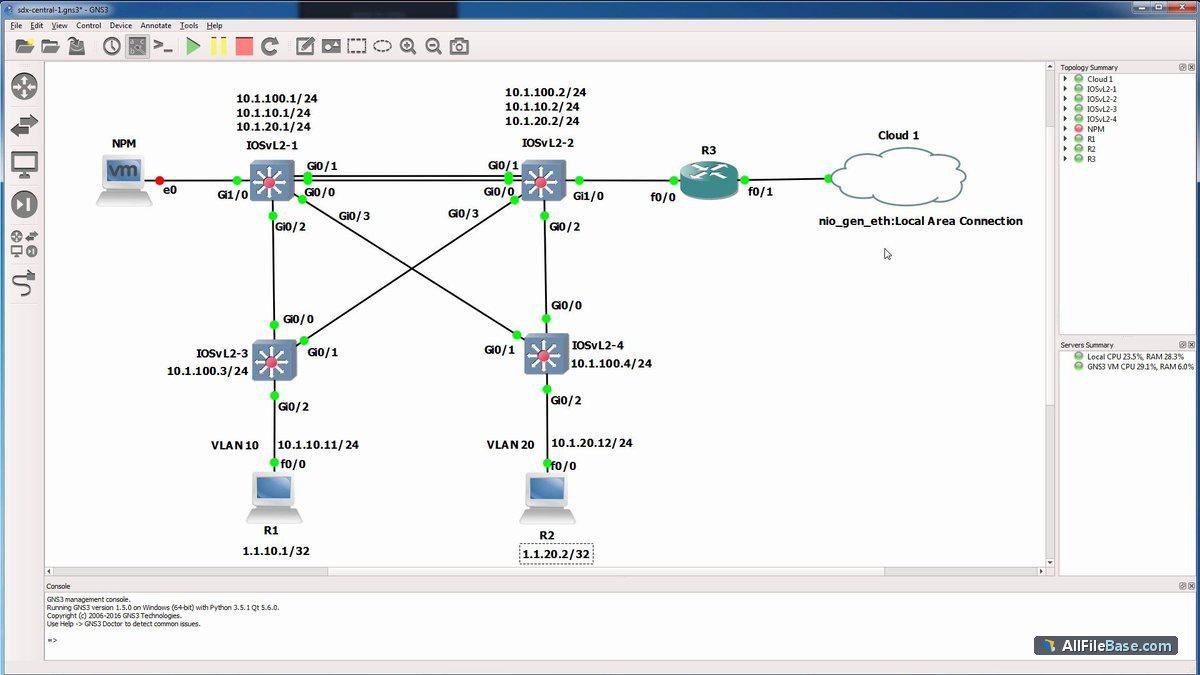
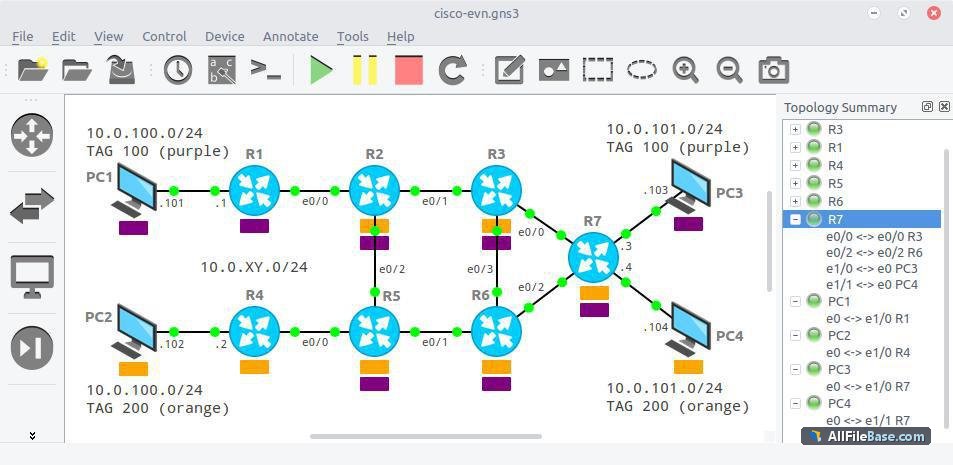
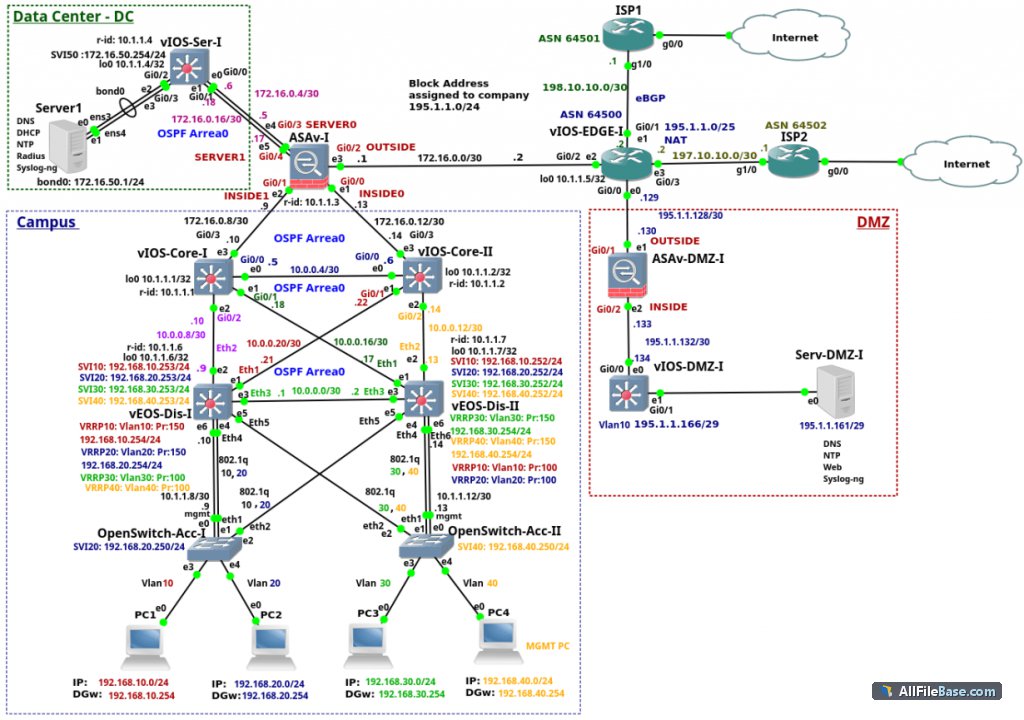
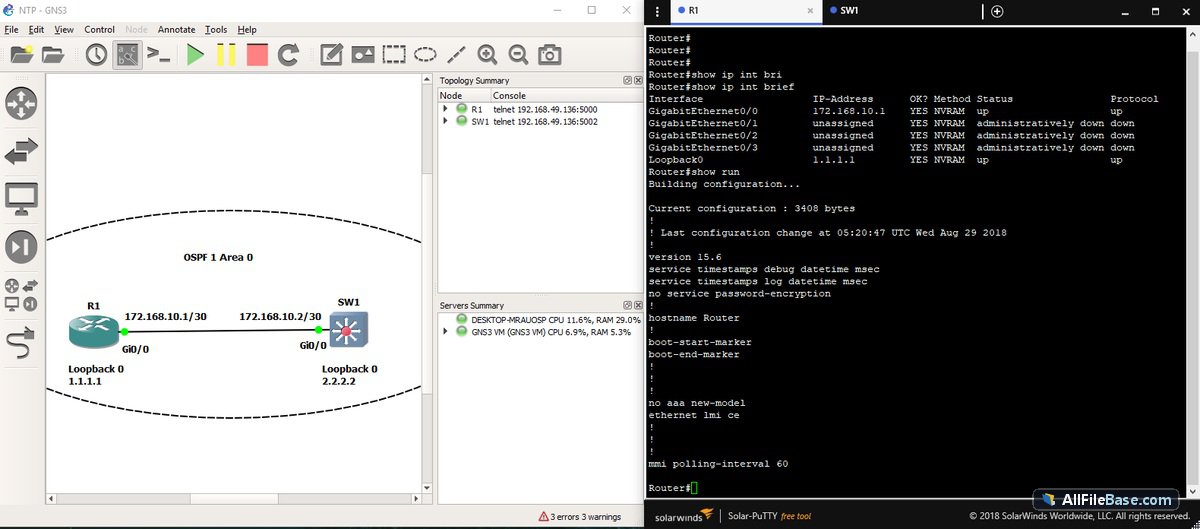
GNS3-3.1.0a6-all-in-one.exe ir pilnīgs patstāvīgais bezsaistes instalētājs (offline installer), kas ļauj veikt pilnīgu instalāciju bez aktīva interneta savienojuma vai tiešsaistes lejupielādētāja nepieciešamības iestatīšanas laikā. Šis uzlabotais tīkla simulatora rīks apvieno gan reālas, gan virtuālas ierīces, nodrošinot iespēju simulēt ārkārtīgi sarežģītas datortīklu infrastruktūras. Programmatūra izmanto jaudīgu emulāciju, lai darbinātu dažādas aparatūras un Cisco IOS, padarot to par neaizstājamu palīgu inženieriem, sistēmu administrātoriem un studentiem, kas gatavojas profesionāliem tīklu sertifikācijas eksāmeniem. Pateicoties grafiskajai saskarnei, lietotāji var zīmēt topoloģijas, konfigurēt maršrutētājus, slēdžus un ugunsmūrus, kā arī analizēt datu plūsmas reāllaikā. GNS3 plaši izmanto vadošie pasaules uzņēmumi un pētniecības centri, lai testētu tīkla izmaiņas pirms to ieviešanas ražošanas vidē, tādējādi samazinot kļūdu riskus.
Galvenās Funkcijas
Pilnīgs bezsaistes instalētājs:Šis izlaidums piedāvā pilnu standalone offline instalatoru, nodrošinot ērtu un pilnīgu iestatīšanu bez tīkla savienojuma vai interneta atkarības.
Reālu un virtuālo ierīču integrācija:Ļauj apvienot fizisko tīklu aparatūru ar virtualizētām iekārtām visaptverošai testēšanai.
Cisco IOS emulācija:Izmanto Dynamips un citas progresīvas emulācijas tehnoloģijas precīzai Cisco aparatūras uzvedības simulācijai.
Grafiskā topoloģijas veidošana:Intuitīva vilkšanas un nomešanas saskarne sarežģītu datortīklu struktūru projektēšanai un pārvaldībai.
Plašs pielietojums un sertifikācija:Ideāls rīks gan uzņēmumu tīkla testēšanai, gan speciālistu sagatavošanai CCNA, CCNP un citiem eksāmeniem.
How to Install / Run
1
Palaidiet bezsaistes instalatoru palaišanas failu tieši no sava lokālā diska.
2
Izpildiet ekrānā redzamos norādījumus un atlasiet nepieciešamos komponentus instalēšanai.
3
Pabeidziet iestatīšanu un palaidiet GNS3, lai sāktu veidot savas tīkla topoloģijas bez interneta pieslēguma.
Plusi / Priekšrocības
Piedāvā pilnvērtīgu bezsaistes iestatīšanu bez interneta prasībām
Nodrošina precīzu sarežģītu tīklu un Cisco iekārtu emulāciju
Plaša lietotāju kopiena un bagātīga dokumentācija
Bezmaksas un atvērtā pirmkoda programmatūra ar GNU GPL licenci
Mīnusi / Ierobežojumi
Prasa ievērojamus datora resursus (RAM, procesoru) lielu topoloģiju darbināšanai
Nepieciešami oriģinālie Cisco IOS attēli, kas jāiegūst atsevišķi
Описание
GNS3-3.1.0a6-all-in-one.exe представляет собой полноценный автономный оффлайн-установщик (offline installer), обеспечивающий полную инсталляцию без необходимости подключения к интернету или использования онлайн-загрузчиков в процессе настройки. Этот передовой сетевой симулятор позволяет объединять виртуальные и реальные устройства для моделирования сложных корпоративных сетей. Программа пользуется огромной популярностью среди инженеров крупных мировых компаний и специалистов, готовящихся к сдаче профессиональных сертификационных экзаменов, таких как Cisco CCNA и CCNP. Интуитивно понятный графический интерфейс позволяет легко проектировать топологии, перетаскивая маршрутизаторы, коммутаторы и межсетевые экраны. Используя мощные механизмы эмуляции, включая Dynamips, GNS3 точно воссоздает поведение реального сетевого оборудования, предоставляя безопасную среду для тестирования конфигураций перед их внедрением в рабочую инфраструктуру.
Ключевые Особенности
Автономный оффлайн-установщик:Данный релиз поставляется в виде полного оффлайн-пакета, позволяя выполнить инсталляцию без зависимости от сети и интернета.
Гибридная симуляция сетей:Возможность объединения физического сетевого оборудования с виртуальными машинами и контейнерами.
Эмуляция Cisco и другого ПО:Использование движков Dynamips и QEMU для точного воспроизведения работы операционных систем сетевых устройств.
Удобный визуальный редактор топологий:Проектирование и настройка сложных многоуровневых сетей с помощью интуитивного интерфейса перетаскивания.
Подготовка к сертификации:Идеальный инструмент для отработки практических навыков сетевых инженеров и подготовки к экзаменам вендоров.
How to Install / Run
1
Запустите автономный оффлайн-установщик исполняемый файл с вашего жесткого диска.
2
Следуйте инструкциям мастера установки и выберите необходимые компоненты симуляции.
3
Завершите установку и запустите GNS3 для создания и тестирования виртуальных сетей в оффлайн-режиме.
Преимущества (Плюсы)
Полный автономный установщик работает полностью без интернета
Точное моделирование работы сложного сетевого оборудования и Cisco IOS
Открытый исходный код и поддержка сообщества по всему миру
Мощная среда для тестирования конфигураций без риска для продакшна
Недостатки (Минусы)
Требует значительных системных ресурсов (ОЗУ и процессора) при симуляции крупных сетей
Образы операционных систем (например, Cisco IOS) необходимо предоставлять самостоятельно
Description
GNS3-3.1.0a6-all-in-one.exe is the full standalone offline installer, allowing complete installation without requiring an active internet connection or online web-downloader during setup. This powerful network software emulator enables the combination of virtual and real devices to simulate complex network architectures. Widely utilized by major global corporations and networking professionals, GNS3 is the premier tool for designing, testing, and troubleshooting enterprise-grade environments as well as preparing for elite IT certification exams like Cisco CCNA and CCNP. The application features an intuitive graphical interface that lets users drag and drop routers, switches, and firewalls, connecting them into intricate topologies. By leveraging advanced emulation backends such as Dynamips, GNS3 accurately replicates proprietary network operating systems, giving engineers a safe, risk-free sandbox environment to experiment with network configurations before deploying them to live production setups.
Key Features
Standalone Offline Installer:This release provides a full offline setup package, enabling complete installation without any network dependency or online downloading during setup.
Virtual and Real Device Combination:Seamlessly integrate physical networking hardware with virtual machines and containers for hybrid testing.
Advanced Cisco Emulation:Utilizes industry-standard Dynamips and QEMU engines to emulate Cisco IOS and other vendor operating systems accurately.
Intuitive Graphical Topology Editor:Design, configure, and visualize complex multi-tier network architectures through a clean drag-and-drop interface.
Certification and Enterprise Readiness:Ideal tool for professional exam preparation and pre-deployment testing for major enterprises and organizations.
How to Install / Run
1
Run the standalone offline installer file the executable file from your computer storage.
2
Follow the wizard prompts and select the required simulation components and server options.
3
Complete the installation process and launch GNS3 to begin building your virtual network topologies offline.
Advantages (Pros)
Includes complete offline installation package without internet dependency
Accurately simulates complex enterprise and Cisco network topologies
Highly extensible architecture supporting various hypervisors and appliances
Backed by an active global community and open-source GNU GPL license
Disadvantages (Cons)
High resource consumption (CPU and RAM) when simulating large-scale topologies
Requires user-supplied firmware/OS images (such as Cisco IOS) due to licensing restrictions
Description
GNS3-3.1.0a6-all-in-one.exe is the full standalone offline installer, allowing complete installation without requiring an active internet connection or online web-downloader during setup. This powerful network software emulator enables the combination of virtual and real devices to simulate complex network architectures. Widely utilized by major global corporations and networking professionals, GNS3 is the premier tool for designing, testing, and troubleshooting enterprise-grade environments as well as preparing for elite IT certification exams like Cisco CCNA and CCNP. The application features an intuitive graphical interface that lets users drag and drop routers, switches, and firewalls, connecting them into intricate topologies. By leveraging advanced emulation backends such as Dynamips, GNS3 accurately replicates proprietary network operating systems, giving engineers a safe, risk-free sandbox environment to experiment with network configurations before deploying them to live production setups.
Key Features
Standalone Offline Installer:This release provides a full offline setup package, enabling complete installation without any network dependency or online downloading during setup.
Virtual and Real Device Combination:Seamlessly integrate physical networking hardware with virtual machines and containers for hybrid testing.
Advanced Cisco Emulation:Utilizes industry-standard Dynamips and QEMU engines to emulate Cisco IOS and other vendor operating systems accurately.
Intuitive Graphical Topology Editor:Design, configure, and visualize complex multi-tier network architectures through a clean drag-and-drop interface.
Certification and Enterprise Readiness:Ideal tool for professional exam preparation and pre-deployment testing for major enterprises and organizations.
How to Install / Run
1
Run the standalone offline installer file the executable file from your computer storage.
2
Follow the wizard prompts and select the required simulation components and server options.
3
Complete the installation process and launch GNS3 to begin building your virtual network topologies offline.
Advantages (Pros)
Includes complete offline installation package without internet dependency
Accurately simulates complex enterprise and Cisco network topologies
Highly extensible architecture supporting various hypervisors and appliances
Backed by an active global community and open-source GNU GPL license
Disadvantages (Cons)
High resource consumption (CPU and RAM) when simulating large-scale topologies
Requires user-supplied firmware/OS images (such as Cisco IOS) due to licensing restrictions
Description
GNS3-3.1.0a6-all-in-one.exe is the full standalone offline installer, allowing complete installation without requiring an active internet connection or online web-downloader during setup. This powerful network software emulator enables the combination of virtual and real devices to simulate complex network architectures. Widely utilized by major global corporations and networking professionals, GNS3 is the premier tool for designing, testing, and troubleshooting enterprise-grade environments as well as preparing for elite IT certification exams like Cisco CCNA and CCNP. The application features an intuitive graphical interface that lets users drag and drop routers, switches, and firewalls, connecting them into intricate topologies. By leveraging advanced emulation backends such as Dynamips, GNS3 accurately replicates proprietary network operating systems, giving engineers a safe, risk-free sandbox environment to experiment with network configurations before deploying them to live production setups.
Key Features
Standalone Offline Installer:This release provides a full offline setup package, enabling complete installation without any network dependency or online downloading during setup.
Virtual and Real Device Combination:Seamlessly integrate physical networking hardware with virtual machines and containers for hybrid testing.
Advanced Cisco Emulation:Utilizes industry-standard Dynamips and QEMU engines to emulate Cisco IOS and other vendor operating systems accurately.
Intuitive Graphical Topology Editor:Design, configure, and visualize complex multi-tier network architectures through a clean drag-and-drop interface.
Certification and Enterprise Readiness:Ideal tool for professional exam preparation and pre-deployment testing for major enterprises and organizations.
How to Install / Run
1
Run the standalone offline installer file the executable file from your computer storage.
2
Follow the wizard prompts and select the required simulation components and server options.
3
Complete the installation process and launch GNS3 to begin building your virtual network topologies offline.
Advantages (Pros)
Includes complete offline installation package without internet dependency
Accurately simulates complex enterprise and Cisco network topologies
Highly extensible architecture supporting various hypervisors and appliances
Backed by an active global community and open-source GNU GPL license
Disadvantages (Cons)
High resource consumption (CPU and RAM) when simulating large-scale topologies
Requires user-supplied firmware/OS images (such as Cisco IOS) due to licensing restrictions
LICENSE PERMISSIONS & LEGAL REFERENCE
Public Distribution Permission:OFFICIALLY PERMITTED TO REDISTRIBUTE (100% Legal Release)
(Guaranteed rights to freely download, copy, and share in unmodified form under open-source / freeware terms).
License Model & Status:GNU General Public License.
Official Distribution Permission:Under the official GNS3 license (GPL), this software is free and permits unrestricted downloading and distribution.