
Title
Attention Anonymous User!Your download speed is severely restricted. Registered users download at full speed without waiting. Register now!

7-Zip v. 26.01
File Archivers (ZIP/RAR)v. 26.01

Original Descriptions
🇱🇻Latvian
🇷🇺Russian
🇬🇧English
Instant Translation
🇩🇪Deutsch
🇪🇸Español
🇫🇷Français
🇪🇪Eesti
🇱🇹Lietuvių
🇵🇱Polski
🇺🇦Українська
🇮🇹Italiano
🇵🇹Português
🇫🇮Suomi
🇸🇪Svenska
🇳🇴Norsk
🇨🇳中文
🇯🇵日本語
Operating System
Windows
1110
Architecture
64-bit (x64)
Apraksts
7-Zip ir bezmaksas un atvērtā pirmkoda failu arhivators, kas paredzēts datu saspiešanai un arhivēšanai Windows vidē. To 1999. gadā izveidoja Igors Pavlovs, un tas izceļas ar savu patentēto 7z formātu, kas izmanto ļoti efektīvus LZMA un LZMA2 saspiešanas algoritmus, nodrošinot augstāku kompresijas pakāpi salīdzinājumā ar daudziem citiem tirgū pieejamajiem rīkiem.Programmatūra piedāvā pilnīgu integrāciju Windows operētājsistēmas konteksta izvēlnē, ļaujot lietotājiem ātri un ērti arhivēt vai atarhivēt failus ar vienu klikšķi. 7-Zip spēj lasīt un ierakstīt plašu arhīvu formātu klāstu, tostarp ZIP, TAR, GZIP un WIM, kā arī atbalsta tādu populāru formātu kā RAR, ISO, CAB un citu atvēršanu un ekstrakciju. Iebūvētais failu pārvaldnieks un komandrindas versija padara to par neaizstājamu rīku gan ikdienas lietotājiem, gan pieredzējušiem sistēmas administratoriem.
Galvenās Funkcijas
- Augsta saspiešanas pakāpe: Jaudīgais 7z formāts ar LZMA un LZMA2 algoritmiem nodrošina ievērojami mazāku arhīva izmēru.
- Plaša formātu saderība: Pilns atbalsts lasīšanai un rakstīšanai tādiem formātiem kā 7z, XZ, BZIP2, GZIP, TAR, ZIP un WIM.
- Integrācija ar Windows: Ērta piekļuve funkcijām tieši no Windows Explorer peles labā klikšķa konteksta izvēlnes.
- Spēcīga šifrēšana: Droša AES-256 šifrēšana gan failu nosaukumiem, gan pašiem datu saturiem 7z un ZIP arhīvos.
- Elastīga komandrinda: Jaudīgs rīks automatizācijai un skriptu izveidei, ko var izmantot dažādās operētājsistēmās.
How to Install / Run
- 1Lejupielādējiet oficiālo 7-Zip instalācijas pakotni 64-bitu Windows sistēmām.
- 2Palaidiet lejupielādēto izpildāmo failu un apstipriniet instalācijas mapi.
- 3Noklikšķiniet uz 'Install', lai pabeigtu instalēšanu, un sāciet izmantot programmu caur konteksta izvēlni.
Plusi / Priekšrocības
- Pilnīgi bezmaksas lietošanai gan mājās, gan komerciālos nolūkos bez reklāmām
- Izcila saspiešanas efektivitāte, kas ietaupa vietu diskā
- Viegla un resursus taupoša programmatūra ar minimālu sistēmas noslodzi
- Ērta sistēmas integrācija ātrai piekļuvei ikdienas darbos
Mīnusi / Ierobežojumi
- Nedaudz askētisks un novecojis lietotāja saskarnes dizains
- Nespēj saglabāt failus RAR formātā licences ierobežojumu dēļ
Описание
7-Zip — это свободный и бесплатный файловый архиватор с открытым исходным кодом, предназначенный для сжатия и упаковки файлов в контейнеры-архивы. Программа разработана Игорем Павловым и впервые выпущена в 1999 году. Она использует собственный формат 7z с передовыми алгоритмами сжатия LZMA и LZMA2, обеспечивающими одну из самых высоких степеней сжатия данных на рынке.Программа органично интегрируется в контекстное меню проводника Windows, что позволяет быстро упаковывать и распаковывать файлы в один клик. 7-Zip поддерживает чтение и запись множества форматов, включая ZIP, TAR, GZIP и WIM, а также распаковку популярных форматов вроде RAR, ISO, CAB и MSI. Наличие графического интерфейса и мощной версии для командной строки делает 7-Zip универсальным инструментом как для обычных пользователей, так и для системных администраторов.
Ключевые Особенности
- Высокая степень сжатия: Фирменный формат 7z с алгоритмами LZMA и LZMA2 обеспечивает минимальный размер получаемых архивов.
- Широкая поддержка форматов: Полная поддержка создания и распаковки 7z, XZ, BZIP2, GZIP, TAR, ZIP и WIM.
- Интеграция в оболочку Windows: Удобный доступ к функциям архивации прямо из контекстного меню проводника.
- Надежное шифрование: Поддержка стойкого шифрования AES-256 для защиты конфиденциальных данных и имен файлов в архивах.
- Версия для командной строки: Полнофункциональная утилита командной строки для автоматизации задач и резервного копирования.
How to Install / Run
- 1Скачайте официальный установщик 7-Zip для 64-битной версии Windows.
- 2Запустите загруженный файл и выберите папку для установки программы.
- 3Нажмите кнопку «Установить» (Install) и используйте архиватор через контекстное меню проводника.
Преимущества (Плюсы)
- Полностью бесплатное ПО без назойливой рекламы и скрытых платежей
- Превосходная эффективность сжатия данных, экономящая дисковое пространство
- Низкие системные требования и минимальное потребление оперативной памяти
- Универсальность при работе с огромным количеством различных форматов архивов
Недостатки (Минусы)
- Простой, спартанский дизайн графического интерфейса
- Отсутствие возможности создавать архивы в формате RAR из-за лицензионных ограничений
Description
7-Zip is a free and open-source file archiver, a utility used to place groups of files within compressed containers known as archives. Developed by Igor Pavlov and first released in 1999, it features its own native 7z format which utilizes the highly efficient LZMA and LZMA2 compression algorithms, consistently achieving superior compression ratios compared to conventional archiving tools.The program integrates seamlessly into the Windows Shell via a context menu, allowing users to compress and extract files rapidly with minimal effort. In addition to its native format, 7-Zip supports reading and writing ZIP, TAR, GZIP, and WIM, while also providing read support for dozens of other popular formats such as RAR, ISO, CAB, and MSI. Featuring both a graphical user interface and a robust command-line version, 7-Zip serves as an indispensable utility for efficient data management.
Key Features
- High Compression Ratio: Proprietary 7z format with LZMA and LZMA2 compression delivers exceptionally compact archive sizes.
- Widespread Format Support: Full read/write capabilities for 7z, XZ, BZIP2, GZIP, TAR, ZIP, and WIM formats.
- Shell Integration: Seamless integration with Windows Explorer context menu for quick archiving and extraction operations.
- Strong Encryption: Robust AES-256 encryption support for securing archive contents and file headers.
- Command Line Interface: Powerful command-line utility for scripting, automation, and advanced data processing tasks.
How to Install / Run
- 1Download the official 64-bit installer package for Windows.
- 2Run the installer executable and choose your preferred destination directory.
- 3Click 'Install' to complete the setup process and access 7-Zip via right-click context menus.
Advantages (Pros)
- Completely free and open-source software with no adware or nagging screens
- Superior compression algorithms that outperform many commercial alternatives
- Extremely lightweight with minimal memory and CPU usage footprint
- Extensive archive format compatibility for versatile file management
Disadvantages (Cons)
- Plain, utilitarian graphical user interface that lacks modern visual styling
- Cannot create archives in RAR format due to proprietary licensing restrictions
Description
7-Zip is a free and open-source file archiver, a utility used to place groups of files within compressed containers known as archives. Developed by Igor Pavlov and first released in 1999, it features its own native 7z format which utilizes the highly efficient LZMA and LZMA2 compression algorithms, consistently achieving superior compression ratios compared to conventional archiving tools.The program integrates seamlessly into the Windows Shell via a context menu, allowing users to compress and extract files rapidly with minimal effort. In addition to its native format, 7-Zip supports reading and writing ZIP, TAR, GZIP, and WIM, while also providing read support for dozens of other popular formats such as RAR, ISO, CAB, and MSI. Featuring both a graphical user interface and a robust command-line version, 7-Zip serves as an indispensable utility for efficient data management.
Key Features
- High Compression Ratio: Proprietary 7z format with LZMA and LZMA2 compression delivers exceptionally compact archive sizes.
- Widespread Format Support: Full read/write capabilities for 7z, XZ, BZIP2, GZIP, TAR, ZIP, and WIM formats.
- Shell Integration: Seamless integration with Windows Explorer context menu for quick archiving and extraction operations.
- Strong Encryption: Robust AES-256 encryption support for securing archive contents and file headers.
- Command Line Interface: Powerful command-line utility for scripting, automation, and advanced data processing tasks.
How to Install / Run
- 1Download the official 64-bit installer package for Windows.
- 2Run the installer executable and choose your preferred destination directory.
- 3Click 'Install' to complete the setup process and access 7-Zip via right-click context menus.
Advantages (Pros)
- Completely free and open-source software with no adware or nagging screens
- Superior compression algorithms that outperform many commercial alternatives
- Extremely lightweight with minimal memory and CPU usage footprint
- Extensive archive format compatibility for versatile file management
Disadvantages (Cons)
- Plain, utilitarian graphical user interface that lacks modern visual styling
- Cannot create archives in RAR format due to proprietary licensing restrictions
Description
7-Zip is a free and open-source file archiver, a utility used to place groups of files within compressed containers known as archives. Developed by Igor Pavlov and first released in 1999, it features its own native 7z format which utilizes the highly efficient LZMA and LZMA2 compression algorithms, consistently achieving superior compression ratios compared to conventional archiving tools.The program integrates seamlessly into the Windows Shell via a context menu, allowing users to compress and extract files rapidly with minimal effort. In addition to its native format, 7-Zip supports reading and writing ZIP, TAR, GZIP, and WIM, while also providing read support for dozens of other popular formats such as RAR, ISO, CAB, and MSI. Featuring both a graphical user interface and a robust command-line version, 7-Zip serves as an indispensable utility for efficient data management.
Key Features
- High Compression Ratio: Proprietary 7z format with LZMA and LZMA2 compression delivers exceptionally compact archive sizes.
- Widespread Format Support: Full read/write capabilities for 7z, XZ, BZIP2, GZIP, TAR, ZIP, and WIM formats.
- Shell Integration: Seamless integration with Windows Explorer context menu for quick archiving and extraction operations.
- Strong Encryption: Robust AES-256 encryption support for securing archive contents and file headers.
- Command Line Interface: Powerful command-line utility for scripting, automation, and advanced data processing tasks.
How to Install / Run
- 1Download the official 64-bit installer package for Windows.
- 2Run the installer executable and choose your preferred destination directory.
- 3Click 'Install' to complete the setup process and access 7-Zip via right-click context menus.
Advantages (Pros)
- Completely free and open-source software with no adware or nagging screens
- Superior compression algorithms that outperform many commercial alternatives
- Extremely lightweight with minimal memory and CPU usage footprint
- Extensive archive format compatibility for versatile file management
Disadvantages (Cons)
- Plain, utilitarian graphical user interface that lacks modern visual styling
- Cannot create archives in RAR format due to proprietary licensing restrictions
LICENSE PERMISSIONS & LEGAL REFERENCE
- Public Distribution Permission: OFFICIALLY PERMITTED TO REDISTRIBUTE (100% Legal Release)
(Guaranteed rights to freely download, copy, and share in unmodified form under open-source / freeware terms). - License Model & Status: GNU Lesser General Public License version 2.1 or later with unRAR restriction.
- Official Distribution Permission: Under the official 7-Zip license (LGPL-2.1-or-later), this software is free and permits unrestricted downloading and distribution.
- Official Project Homepage: https://www.7-zip.org.
- Exact License & Terms Link: https://www.gnu.org/licenses/lgpl-2.1.html.
- Official License Registry (Alternative Legal Source): https://www.7-zip.org/license.txt.
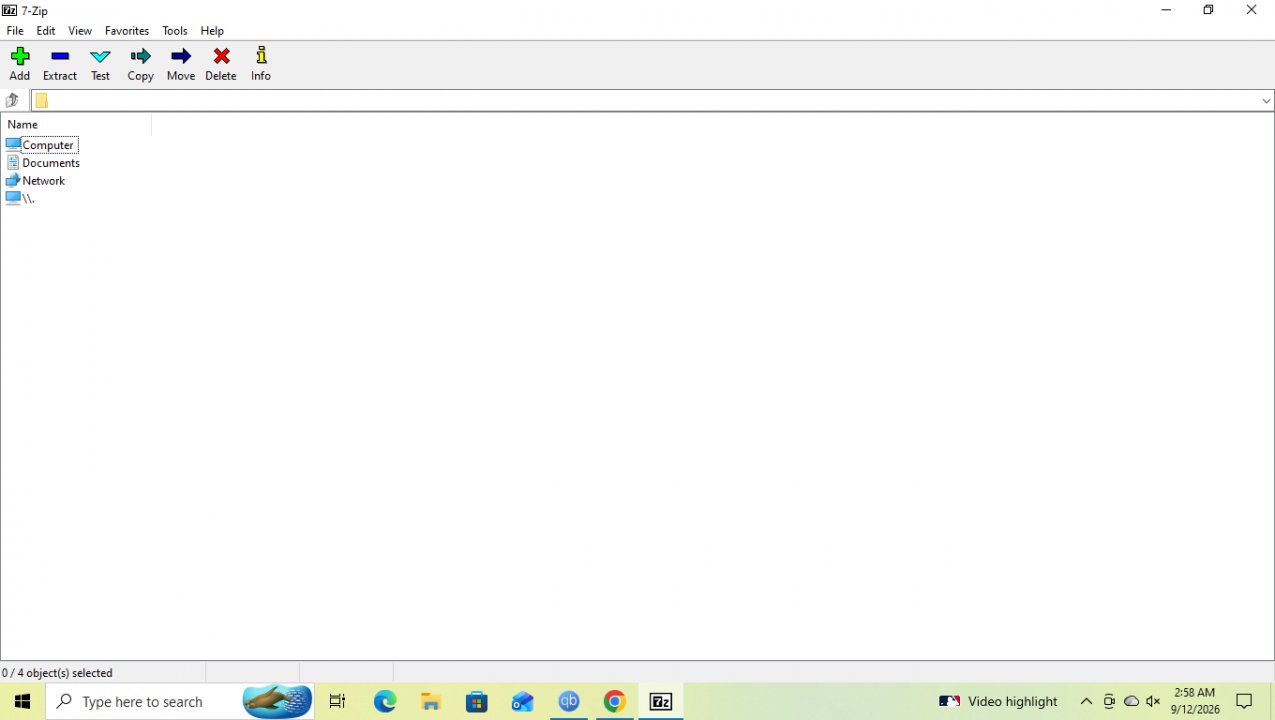
Images
Similar / Other Versions


Technical Specifications
- DeveloperIgor Pavlov
- Release Date27.04.2026
- Operating SystemWindows1110
- Architecture64-bit (x64)
- Release FormatSetup / Installer Portable
- Languages🌍🇱🇻🇷🇺🇬🇧🇺🇦🇩🇪🇫🇷
- Official Homepage7-zip.org
- filesView (1)
System Requirements
- Processor (CPU)1 GHz or faster processor (x64)
- Memory (RAM)1 GB
- Free Disk Space50 MB
- Graphics Card (GPU)Standard display (No dedicated GPU required)
Rating
None
Said thanks
📢 Advertisement[+]
Want to be seen by everyone?Place your ad here using your site balance! The perfect spot to promote your releases, clan, or links.VPNMost people overpay for a VPN without realising it. CometVPN starts from just $1.89/month — same privacy, same security, same speeds as the big names. Just without the big price tag.Your text ad here!Grab this spot using your accumulated balance and get noticed.
+ Add your advertisement
📂 files (1)
×
| Path | Size |
|---|---|
| 7zip.exe | 1.58 MB |
❮
×
![]()
❯
Share on Facebook
Choose the image you want to see in your Facebook post:
Choose which image you want to see in your Facebook post and click "Share this image":
 Screenshot 1
 Screenshot 2
Facebook will automatically load the selected image in your post preview!
Facebook will automatically load the chosen image in the post preview.
🌐 All Supported Languages 61
🇿🇦
Afrikaans
AF
🇦🇱
Albanian
Shqip
SQ
🇸🇦
Arabic
العربية
AR
🇦🇲
Armenian
Հայերեն
HY
🇦🇿
Azerbaijani
Azərbaycan
AZ
🇪🇸
Basque
Euskara
EU
🇧🇾
Belarusian
Беларуская
BE
🇧🇩
Bengali
বাংলা
BN
🇧🇦
Bosnian
Bosanski
BS
🇧🇬
Bulgarian
Български
BG
🇪🇸
Catalan
Català
CA
🇨🇳
Chinese (Simplified)
简体中文
ZH-CN
🇹🇼
Chinese (Traditional)
繁體中文
ZH-TW
🇭🇷
Croatian
Hrvatski
HR
🇨🇿
Czech
Čeština
CS
🇩🇰
Danish
Dansk
DA
🇳🇱
Dutch
Nederlands
NL
🇬🇧
English
EN
🟢
Esperanto
EO
🇪🇪
Estonian
Eesti
ET
🇫🇮
Finnish
Suomi
FI
🇫🇷
French
Français
FR
🇪🇸
Galician
Galego
GL
🇬🇪
Georgian
ქართული
KA
🇩🇪
German
Deutsch
DE
🇬🇷
Greek
Ελληνικά
EL
🇮🇱
Hebrew
עברית
HE
🇮🇳
Hindi
हिन्दी
HI
🇭🇺
Hungarian
Magyar
HU
🇮🇸
Icelandic
Íslenska
IS
🇮🇩
Indonesian
Bahasa Indonesia
ID
🇮🇹
Italian
Italiano
IT
🇯🇵
Japanese
日本語
JA
🇰🇷
Korean
한국어
KO
🇹🇷
Kurdish
Kurdî
KU
🇱🇻
Latvian
Latviešu
LV
🇱🇹
Lithuanian
Lietuvių
LT
🇲🇰
Macedonian
Македонски
MK
🇲🇾
Malay
Bahasa Melayu
MS
🇮🇳
Marathi
मराठी
MR
🇲🇳
Mongolian
Монгол
MN
🇳🇵
Nepali
नेपाली
NE
🇳🇴
Norwegian
Norsk
NO
🇮🇷
Persian
فارسی
FA
🇵🇱
Polish
Polski
PL
🇧🇷
Portuguese (Brazil)
Português (Brasil)
PT-BR
🇵🇹
Portuguese
Português
PT
🇷🇴
Romanian
Română
RO
🇷🇺
Russian
Русский
RU
🇷🇸
Serbian
Srpski
SR
🇸🇰
Slovak
Slovenčina
SK
🇸🇮
Slovenian
Slovenščina
SL
🇪🇸
Spanish
Español
ES
🇸🇪
Swedish
Svenska
SV
🇮🇳
Tamil
தமிழ்
TA
🇹🇭
Thai
ไทย
TH
🇹🇷
Turkish
Türkçe
TR
🇺🇦
Ukrainian
Українська
UK
🇺🇿
Uzbek
Oʻzbekcha
UZ
🇻🇳
Vietnamese
Tiếng Việt
VI
🏴
Welsh
Cymraeg
CY
No matching languages found
Total supported languages: 61