
Title
Attention Anonymous User!Your download speed is severely restricted. Registered users download at full speed without waiting. Register now!

Notepad++ v. 8.9.8
Programming & ITv. 8.9.8

Original Descriptions
🇱🇻Latvian
🇷🇺Russian
🇬🇧English
Instant Translation
🇩🇪Deutsch
🇪🇸Español
🇫🇷Français
🇪🇪Eesti
🇱🇹Lietuvių
🇵🇱Polski
🇺🇦Українська
🇮🇹Italiano
🇵🇹Português
🇫🇮Suomi
🇸🇪Svenska
🇳🇴Norsk
🇨🇳中文
🇯🇵日本語
Operating System
Windows
11108/8.17
Architecture
32-bit (x86)64-bit (x64)
Apraksts
Notepad++ ir viens no populārākajiem un jaudīgākajiem teksta un pirmkoda redaktoriem operētājsistēmai Microsoft Windows, kas balstīts uz Scintilla komponentu. Programma piedāvā plašas iespējas programmētājiem un sistēmu administratoriem, atbalstot cilņu rediģēšanu (tabbed editing), kas ļauj ērti strādāt ar vairākiem failiem vienā logā. Tā izceļas ar ārkārtīgi zemu resursu patēriņu un augstu darbības ātrumu salīdzinājumā ar smagākām integrētajām izstrādes vidēm.
Pateicoties bagātīgajam sintakses izcelšanas (syntax highlighting) atbalstam vairāk nekā 80 programmēšanas un iezīmēšanas valodām, kā arī koda locīšanai (code folding), makro ierakstīšanai un spraudņu sistēmai, Notepad++ ir kļuvis par neaizstājamu rīku ikdienas darbā. Tas nodrošina pilnu atbalstu Windows DirectWrite tehnoloģijai un dažādiem krāsu fontu formātiem, nodrošinot augstas izšķirtspējas ekrānu saderību.
Galvenās Funkcijas
- Sintakses izcelšana un locīšana: Atbalsta vairāk nekā 80 programmēšanas valodas, automātiski formatējot un strukturējot kodu labākai pārskatāmībai.
- Cilņu rediģēšanas saskarne: Ļauj ērti atvērt, rediģēt un pārvaldīt vairākus dokumentus vienlaicīgi vienā logā vai vairākos skatos.
- Spraudņu paplašināmība: Iespēja uzstādīt papildu rīkus un paplašinājumus caur integrēto spraudņu pārvaldnieku, pielāgojot lietotni savām vajadzībām.
- Regulāro izteiksmju atbalsts: Jaudīga meklēšanas un aizvietošanas sistēma, kas izmanto regulārās izteiksmes sarežģītu teksta manipulāciju veikšanai.
- Makro ierakstīšana un atskaņošana: Automātiskas atkārtotu darbību sekvences, kas ievērojami paātrina rutīnas uzdevumu izpildi tekstā.
How to Install / Run
- 1Lejupielādējiet oficiālo instalācijas pakotni no programmas mājaslapas.
- 2Palaidiet instalācijas failu un sekojiet ekrānā redzamajiem norādījumiem.
- 3Pabeidziet instalēšanu un atveriet Notepad++, lai sāktu darbu ar teksta vai koda failiem.
Plusi / Priekšrocības
- Pilnīgi bezmaksas un atvērtā pirmkoda programmatūra
- Ļoti ātra darbība un minimāls sistēmas resursu patēriņš
- Plaša kopiena un milzīgs noderīgu spraudņu klāsts
- Ērta vairāku failu pārvaldība ar cilnēm un dalīto logu skatu
Mīnusi / Ierobežojumi
- Oficiāli pieejams tikai Microsoft Windows operētājsistēmai
- Noklusējuma dizains var šķist novecojis bez papildu tēmām
Описание
Notepad++ — это популярный, мощный и быстрый текстовый и исходного кода редактор для операционной системы Microsoft Windows, созданный на базе компонента Scintilla. Программа поддерживает многовкладочный интерфейс, позволяющий одновременно работать с большим количеством файлов в одном окне. Благодаря оптимизированному коду Notepad++ потребляет минимум системных ресурсов и запускается практически мгновенно, что делает его идеальным выбором как для повседневных задач, так и для профессиональной разработки.
Редактор поддерживает подсветку синтаксиса и сворачивание кода для более чем 80 языков программирования и разметки. Встроенные инструменты поиска и замены с поддержкой регулярных выражений, запись макросов, поддержка плагинов и функция разделения экрана значительно упрощают работу с текстом и кодом. Программа полностью совместима с технологией Windows DirectWrite, обеспечивая четкое отображение шрифтов и интерфейса.
Ключевые Особенности
- Подсветка синтаксиса и сворачивание кода: Поддержка более 80 языков программирования с возможностью настройки тем оформления.
- Интерфейс с вкладками: Удобная работа с множеством документов одновременно в одном окне или с разделением экрана.
- Система плагинов: Расширение функционала с помощью встроенного менеджера плагинов (FTP, форматирование, проверки).
- Мощный поиск и регулярные выражения: Быстрый поиск текста по одному или нескольким файлам с использованием регулярных выражений.
- Макросы: Запись и воспроизведение последовательностей пользовательских действий для автоматизации рутины.
How to Install / Run
- 1Загрузите официальный установочный файл программы из надежного источника.
- 2Запустите инсталлятор и следуйте подсказкам на экране.
- 3Завершите установку и откройте Notepad++ для работы с вашими текстовыми файлами.
Преимущества (Плюсы)
- Распространяется бесплатно под лицензией GNU GPL с открытым исходным кодом
- Высокая скорость работы и рекордно низкое потребление памяти
- Огромное сообщество и множество полезных плагинов
- Стабильная работа с крупными лог-файлами и объемными документами
Недостатки (Минусы)
- Официальная версия разработана исключительно для платформы Windows
- Интерфейс настроек может показаться перегруженным для новичков
Description
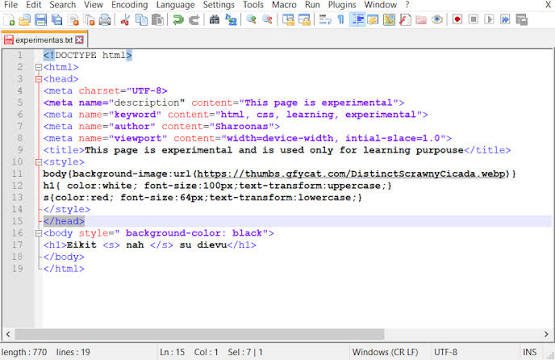
Notepad++ is a feature-rich, highly optimized text and source code editor for Microsoft Windows built upon the powerful Scintilla editing component. Designed for both casual users and professional software developers, it provides tabbed editing to handle multiple open documents seamlessly within a single window. Known for its exceptional execution speed and remarkably low memory footprint, Notepad++ stands as a lightweight yet remarkably capable alternative to bulky integrated development environments.
Equipped with robust syntax highlighting and code folding for over 80 programming and markup languages, Notepad++ streamlines software development workflows. It supports powerful regular expression search and replace operations, macro recording for automating repetitive edits, multi-document views, and a rich plugin ecosystem that extends its core capabilities. With built-in support for Windows DirectWrite and modern color font formats, it guarantees a crisp, modern visual experience.
Key Features
- Advanced Syntax Highlighting and Folding: Out-of-the-box support for over 80 programming languages with customizable color themes and code structuring.
- Multi-Document Tabbed Interface: Effortlessly work across multiple files simultaneously using independent tabs or split-screen views.
- Extensible Plugin Architecture: Enhance functionality with a built-in plugin manager supporting syntax checks, formatters, FTP integration, and more.
- Powerful Search and Regular Expressions: Precise search, multi-file text finding, and advanced regex-based replacement tools.
- Macro Recording and Execution: Record keystrokes and playback repetitive text manipulation tasks to maximize developer productivity.
How to Install / Run
- 1Download the verified setup package from the official Notepad++ source.
- 2Execute the installer executable and choose your preferred installation settings.
- 3Launch Notepad++ from your desktop or Start menu to begin editing files.
Advantages (Pros)
- Free and open-source software distributed under the GNU GPL
- Exceptionally fast startup and minimal CPU/RAM usage
- Massive ecosystem of community-driven plugins and themes
- Robust support for large text and log files without crashing
Disadvantages (Cons)
- Native builds are restricted to the Microsoft Windows platform
- Advanced features require exploring plugins or settings menus
Description
Notepad++ is a feature-rich, highly optimized text and source code editor for Microsoft Windows built upon the powerful Scintilla editing component. Designed for both casual users and professional software developers, it provides tabbed editing to handle multiple open documents seamlessly within a single window. Known for its exceptional execution speed and remarkably low memory footprint, Notepad++ stands as a lightweight yet remarkably capable alternative to bulky integrated development environments.
Equipped with robust syntax highlighting and code folding for over 80 programming and markup languages, Notepad++ streamlines software development workflows. It supports powerful regular expression search and replace operations, macro recording for automating repetitive edits, multi-document views, and a rich plugin ecosystem that extends its core capabilities. With built-in support for Windows DirectWrite and modern color font formats, it guarantees a crisp, modern visual experience.
Key Features
- Advanced Syntax Highlighting and Folding: Out-of-the-box support for over 80 programming languages with customizable color themes and code structuring.
- Multi-Document Tabbed Interface: Effortlessly work across multiple files simultaneously using independent tabs or split-screen views.
- Extensible Plugin Architecture: Enhance functionality with a built-in plugin manager supporting syntax checks, formatters, FTP integration, and more.
- Powerful Search and Regular Expressions: Precise search, multi-file text finding, and advanced regex-based replacement tools.
- Macro Recording and Execution: Record keystrokes and playback repetitive text manipulation tasks to maximize developer productivity.
How to Install / Run
- 1Download the verified setup package from the official Notepad++ source.
- 2Execute the installer executable and choose your preferred installation settings.
- 3Launch Notepad++ from your desktop or Start menu to begin editing files.
Advantages (Pros)
- Free and open-source software distributed under the GNU GPL
- Exceptionally fast startup and minimal CPU/RAM usage
- Massive ecosystem of community-driven plugins and themes
- Robust support for large text and log files without crashing
Disadvantages (Cons)
- Native builds are restricted to the Microsoft Windows platform
- Advanced features require exploring plugins or settings menus
Description
Notepad++ is a feature-rich, highly optimized text and source code editor for Microsoft Windows built upon the powerful Scintilla editing component. Designed for both casual users and professional software developers, it provides tabbed editing to handle multiple open documents seamlessly within a single window. Known for its exceptional execution speed and remarkably low memory footprint, Notepad++ stands as a lightweight yet remarkably capable alternative to bulky integrated development environments.
Equipped with robust syntax highlighting and code folding for over 80 programming and markup languages, Notepad++ streamlines software development workflows. It supports powerful regular expression search and replace operations, macro recording for automating repetitive edits, multi-document views, and a rich plugin ecosystem that extends its core capabilities. With built-in support for Windows DirectWrite and modern color font formats, it guarantees a crisp, modern visual experience.
Key Features
- Advanced Syntax Highlighting and Folding: Out-of-the-box support for over 80 programming languages with customizable color themes and code structuring.
- Multi-Document Tabbed Interface: Effortlessly work across multiple files simultaneously using independent tabs or split-screen views.
- Extensible Plugin Architecture: Enhance functionality with a built-in plugin manager supporting syntax checks, formatters, FTP integration, and more.
- Powerful Search and Regular Expressions: Precise search, multi-file text finding, and advanced regex-based replacement tools.
- Macro Recording and Execution: Record keystrokes and playback repetitive text manipulation tasks to maximize developer productivity.
How to Install / Run
- 1Download the verified setup package from the official Notepad++ source.
- 2Execute the installer executable and choose your preferred installation settings.
- 3Launch Notepad++ from your desktop or Start menu to begin editing files.
Advantages (Pros)
- Free and open-source software distributed under the GNU GPL
- Exceptionally fast startup and minimal CPU/RAM usage
- Massive ecosystem of community-driven plugins and themes
- Robust support for large text and log files without crashing
Disadvantages (Cons)
- Native builds are restricted to the Microsoft Windows platform
- Advanced features require exploring plugins or settings menus
LICENSE PERMISSIONS & LEGAL REFERENCE
- Public Distribution Permission: OFFICIALLY PERMITTED TO REDISTRIBUTE (100% Legal Release)
(Guaranteed rights to freely download, copy, and share in unmodified form under open-source / freeware terms). - License Model & Status: GNU General Public License v3.0 or later.
- Official Distribution Permission: Under the official Notepad++ license (GPLv3+), this software is free and permits unrestricted downloading and distribution.
- Official Project Homepage: https://notepad-plus-plus.org.
- Exact License & Terms Link: https://www.gnu.org/licenses/gpl-3.0.html.
- Official License Registry (Alternative Legal Source): https://notepad-plus-plus.org.
Images
Similar / Other Versions
No similar torrents found.
Technical Specifications
- DeveloperDon Ho
- Release Date23.08.2026
- Operating SystemWindows11108/8.17
- Architecture32-bit (x86) 64-bit (x64)
- Release FormatSetup / Installer Portable
- Languages🌍🇱🇻🇷🇺🇬🇧🇺🇦🇩🇪🇫🇷
- Official Homepagenotepad-plus-plus.org
- filesView (1)
System Requirements
- Processor (CPU)1 GHz x86 or x64 processor
- Memory (RAM)512 MB
- Free Disk Space20 MB
- Graphics Card (GPU)Standard display (No dedicated GPU required)
Rating
None
Said thanks
📢 Advertisement[+]
Your text ad here!Grab this spot using your accumulated balance and get noticed.Want to be seen by everyone?Place your ad here using your site balance! The perfect spot to promote your releases, clan, or links.VPNMost people overpay for a VPN without realising it. CometVPN starts from just $1.89/month — same privacy, same security, same speeds as the big names. Just without the big price tag.
+ Add your advertisement
📂 files (1)
×
| Path | Size |
|---|---|
| npp.8.9.8.Installer.x64.exe | 6.63 MB |
❮
×
![]()
❯
Share on Facebook
Choose the image you want to see in your Facebook post:
Choose which image you want to see in your Facebook post and click "Share this image":
 Screenshot 1
 Screenshot 2
Facebook will automatically load the selected image in your post preview!
Facebook will automatically load the chosen image in the post preview.
🌐 All Supported Languages 74
🇿🇦
AF
🇪🇸
AN
🇸🇦
AR
🇦🇿
AZ
🇧🇾
BE
🇧🇬
BG
🇧🇩
BN
🇧🇦
BS
🇫🇷
BR
🇪🇸
CA
🇫🇷
CO
🇨🇿
CS
🏴
CY
🇩🇰
DA
🇩🇪
DE
🇬🇷
EL
🇬🇧
EN
🟢
EO
🇪🇸
ES
🇪🇪
ET
🇪🇸
EU
🇮🇷
FA
🇫🇮
FI
🇵🇭
FIL
🇫🇷
FR
🇮🇪
GA
🇪🇸
GL
🇮🇳
GU
🇮🇱
HE
🇮🇳
HI
🇭🇷
HR
🇭🇺
HU
🇮🇩
ID
🇮🇹
IT
🇯🇵
JA
🇬🇪
KA
🇰🇿
KK
🇮🇳
KN
🇰🇷
KO
🇮🇶
KU
🇰🇬
KY
🇱🇺
LB
🇱🇹
LT
🇱🇻
LV
🇲🇰
MK
🇲🇳
MN
🇮🇳
MR
🇲🇾
MS
🇳🇵
NE
🇳🇱
NL
🇳🇴
NO
🇫🇷
OC
🇮🇳
PA
🇵🇱
PL
🇵🇹
PT
🇷🇴
RO
🇷🇺
RU
🇱🇰
SI
🇸🇰
SK
🇸🇮
SL
🇦🇱
SQ
🇷🇸
SR
🇸🇪
SV
🇮🇳
TA
🇮🇳
TE
🇹🇯
TG
🇹🇭
TH
🇹🇷
TR
🇺🇦
UK
🇵🇰
UR
🇺🇿
UZ
🇻🇳
VI
🇨🇳
ZH
🇿🇦
ZU
No matching languages found
Total supported languages: 74